

Resilient Infrastructure
Overview
We will be delivering critical security enhancements across Cisco products, some of which may require our customers to take action. We're committed to making this transition as seamless and non-disruptive as possible and will continue to update this page for the latest guidance and resources. Here’s what else you need to know.
- Proactive Security Enhancements: To increase the security posture of Cisco devices, we are making changes to default settings, deprecating and eventually removing insecure capabilities, and introducing new security features. These changes are designed to strengthen your network infrastructure and provide better visibility into threat actor activities.
- Your Action is Key: We encourage all customers to adopt improved security practices now and discontinue the use of insecure features. This will strengthen your security posture and prepare you for these essential enhancements.
- Comprehensive Guidance: This page provides up-to-date information on these changes, our strategy for phasing them in, and specific actions you should take now to be ready.
Cisco is continuously evolving its product portfolio to address the growing complexity and sophistication of today’s threat landscape. As part of this commitment, we are enhancing default configurations to provide stronger out-of-the-box protection, introducing advanced security capabilities to safeguard modern deployments, and retiring legacy features that no longer align with current security standards. These changes are designed to help organizations build and maintain a more resilient, secure, and future-ready infrastructure. We strongly encourage customers to adopt these modern capabilities and align their deployments with industry best practices. For additional guidance on building resilient infrastructure, please visit www.cisco.com/go/ri.
This document provides guidance on how to migrate to the secure alternatives of outdated/legacy protocols in your Meraki networks.
The following list of features and protocols are planned for eventual removal from Cisco products. The list provides details on why the feature or protocol is considered insecure and suggests secure alternatives when available. Not all platforms and operating systems support all these features.
These features and protocols will be phased out gradually. Platform-specific details on when each feature will reach the warning, restriction, and removal phases are planned to be provided well in advance of the change.
| Feature/Protocol | What is insecure? | Cisco Recommendation |
|
SNMPv1/ SNMPv2c
|
Community strings and data are unencrypted allowing attackers easy access to sensitive data and (in case of SNMP writes) the ability to modify system configuration. |
Utilize SNMPv3 with authentication and encryption (AuthPriv) |
| SNMPv3 with DES encryption | DES is weak by modern encryption standards. | Uses AES encryption for SNMPv3 |
| TLS 1.0 / TLS 1.1 |
Formally deprecated by the IETF through RFC 8996 in 2021 due to many cryptographic weaknesses and vulnerabilities including their reliance on SHA1 for message integrity. |
Cisco will automatically migrate system services to utilize TLS 1.3. (Please refer to individual product release notes for more details) |
|
HTTP |
Can expose credentials and other sensitive data and is vulnerable to man in the middle attacks because of lack of encryption and message integrity checks. |
Cisco will automatically migrate system services to HTTPS |
| RADIUS |
MD5 is generally considered cryptographically weak and compromise of a pre-shared key (especially when the same key is used for many devices) can lead to attackers being able to decode sensitive credentials sent on the network. |
Use RADSEC (RADIUS over TLS) or RADIUS over DTLS. |
| IPSEC Insecure Ciphers | Legacy cryptographic algorithms no longer provide adequate protection against modern threats. Many of these algorithms are vulnerable to known cryptographic attacks due to providing insufficient key strength, and therefore do not meet current industry security standards. | Legacy cryptographic algorithms will be deprecated. Modern ciphers should be used. |
Configuring secure alternatives
SNMP
SNMP can be configured for network devices from the Network-wide menu, and for the Dashboard from the Organization menu.
NOTE: To use SNMPv3 with AES encryption on your Cisco devices, you will need to configure your SNMP server to use SNMPv3 with AES128 as well.
SNMP for network devices
To view and edit the SNMP setting for the Network devices, navigate to Network-wide > [Configure] General > Reporting. If your network is configured with SNMPv2 or SNMPv3, you will see the following settings.
Identifying SNMPv2 configuration

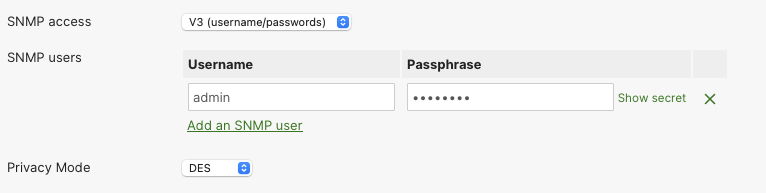
Identifying SNMPv3 with DES configuration
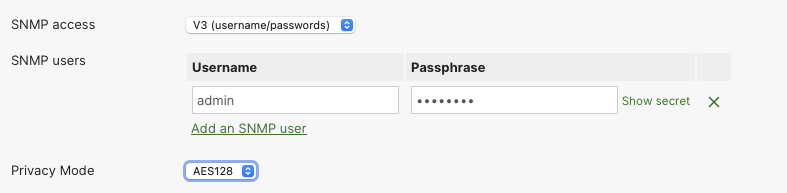
Configuring SNMPv3 with AES128
To configure SNMPv3 with AES encryption, select:
- SNMP access: V3 (username/passwords)
- Privacy Mode: AES128
SNMP for Dashboard
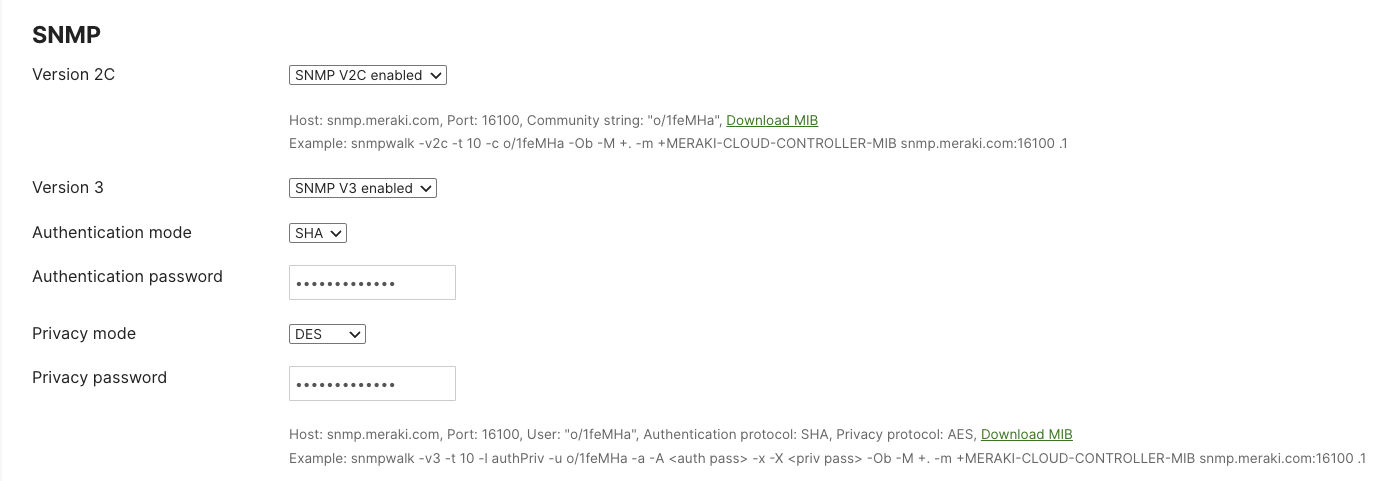
To view and edit the SNMP setting for the Network, navigate to Organization > [Configure] Settings > SNMP. If your Organization has been configured with SNMPv2 or SNMPv3 with DES, you will see the following settings.
Identfiying SNMPv2 and SNMPv3 with DES configurations
NOTE: Cisco Campus Gateway will only support SNMPv3 version. It will not support the legacy SNMPv1 / SNMPv2c versions