

VRF for WAN Appliances
Overview
VRF (Virtual Routing and Forwarding) lets a single router use multiple virtual routing tables. It separates different network segments, so they can use the same IP addresses without conflicts. This works without needing MPLS or complex setups.
What it does
- Overlapping IP Addresses: This allows different networks or customers to use the same IP address ranges without interfering with each other.
- Isolation: Each VRF (Virtual Routing and Forwarding) instance is isolated, meaning traffic destined for one VRF cannot reach devices in another VRF by default.
- Simplifies Management: VRF Lite can simplify network management by allowing for the logical segmentation of a network.
- No MPLS Required: Unlike full VRF implementations, VRF Lite does not require MPLS (Multiprotocol Label Switching) or MP-BGP (Multiprotocol Border Gateway Protocol).
- Creates Virtual Routing Tables: VRF Lite essentially carves up a single physical router into multiple logical routers, each with its own routing table.
How it works
- VLANs: Traffic received on a VLAN configured with a specific VRF will be assigned to that VRF.
- Routing Tables: Each VRF has its own routing table, independent of other VRFs.
- Forwarding: Traffic is forwarded based on the routing table associated with the VRF to which the incoming interface belongs.
Use Cases
-
Multi-Tenant Environments: Service providers can use VRF Lite to isolate traffic from different customers on the same physical infrastructure.
-
Network Segmentation: VRF Lite can be used to logically separate different departments or functions within an organization.
-
Guest Networks: It can be used to isolate guest Wi-Fi networks from the corporate network.
-
Merging Networks: VRF Lite can help when merging networks with overlapping IP address spaces, avoiding the need for extensive re-addressing.

Requirements and Limitations
- VRFs are supported on MX 26.1.4+ in Routed Mode.
- VRFs are not supported in Auto VPN fabrics that use hubs in Concentrator Mode - all of the devices must be in Routed Mode.
- 7 VRFs can be configured within a dashboard organization to be used in addition to the Default VRF.
Configuring a VRF
VRF enablement will disable overlapping subnet validation for the organization and may produce unforeseen outcomes if identical subnets are assigned to the same VRF. Overlapping or identical subnets should only be assigned to separate VRFs.
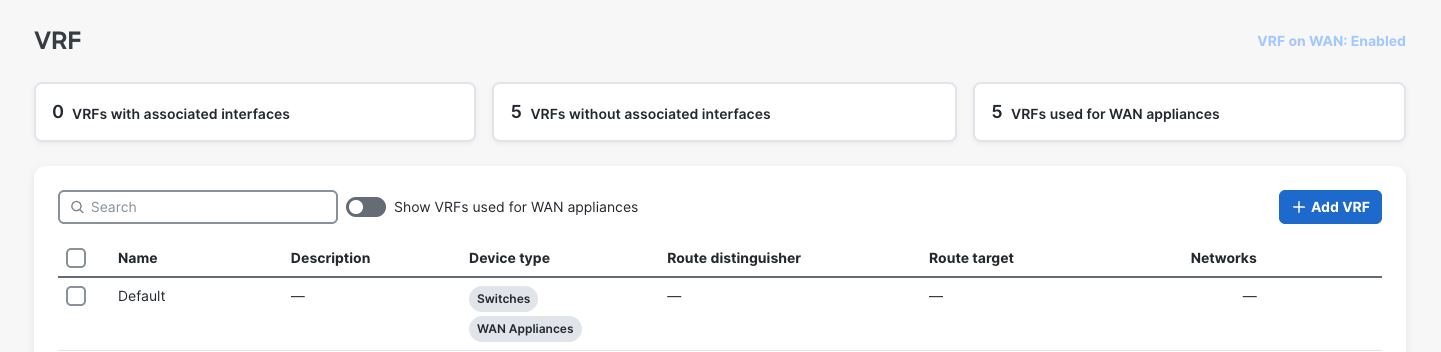
- Click Organization on the left menu, then click on VRFs.
- Click Enable VRF on WAN to allow creation of VRFs for WAN appliances.
- Click Add VRF.
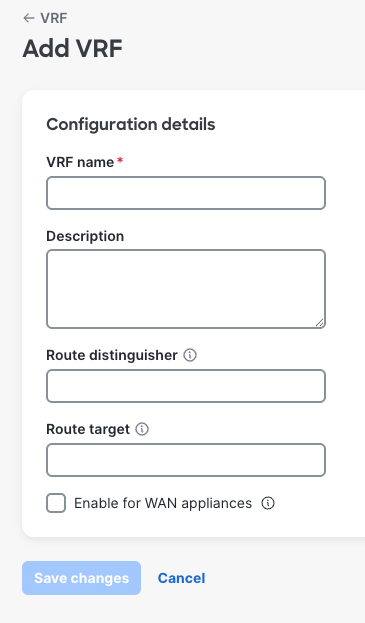
- VRF Name: A friendly name for the VRF.
- Description: A friendly name/description for the VRF.
- Route Distinguisher: Assign a route distinguisher (RD) for the VRF that helps identify a virtual routing domain in a provider's network and allows for overlapping IP space. The route distinguisher must be a unique value on the router for each VRF.
- Format requirements: Route distinguisher is generally expressed in the format of ASN Number:Unique number. Example: 65000:10. However, following are the format requirements. The format consists of two parts separated by a colon (:)
- First part can be one of the three formats:
- Two decimal numbers separated by a dot, each number having 1 to 10 digits (e.g., 123.456).
- A single decimal number with 1 to 10 digits (e.g., 22 or 1234567890).
- A valid IPv4 address in dotted decimal notation.
- The second part after the colon is a decimal number with 1 to 10 digits (e.g., 22 or 1234567890).
- First part can be one of the three formats:
- Format requirements: Route distinguisher is generally expressed in the format of ASN Number:Unique number. Example: 65000:10. However, following are the format requirements. The format consists of two parts separated by a colon (:)
- Route Target: Assign a route target (RT) to control the redistribution of routes between different VRFs. RTs identify which VRF a route belongs to, allowing for selective sharing of routes between VRFs.
- Format requirements: Same as the requirements for Route distinguisher.
- Enable for WAN appliances: Check box to enable the VRF to be used for WAN appliances.
Note: Route Distinguishers and Route Targets are to be supported in a later release. These configurations will not affect VRFs for WAN appliances in 26.1.
Associating VLANs to a VRF
- Click Security & SD-WAN on the left menu, then click on Addressing and VLANs.
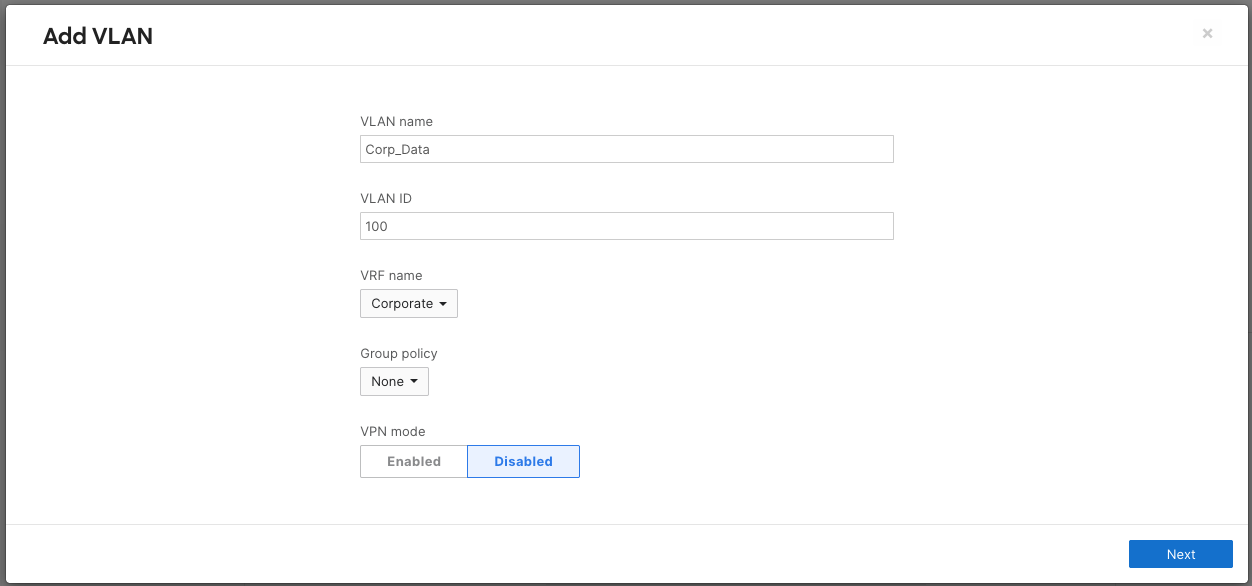
- Select the VLAN you would like to edit and add to a pre-configured VRF.
- By default, all VLAN subnets reside in the Global VRF.
- In the VRF drop down box, select the VRF you would like to assign the selected VLAN to.
- Click Next & Save changes.
Auto VPN and VRFs
-
Auto VPN enabled WAN appliances that have VLANs associated VRFs can enable subnets to be advertised for end-to-end overlay segmentation by way of VPN packet header data.
- Click Security & SD-WAN on the left menu, then click on Site to Site VPN.
- For the subnet you would like to enable for AutoVPN, select enabled from the drop down.
- Click Save changes.

Removing VLANs from a VRF
- Click Security & SD-WAN on the left menu, then click on Addressing and VLANs.
-
- In the VRF drop down box, select the Global VRF to move back to the default VRF.
- Click Save changes.
- Select the VLAN you would like to edit and remove from the configured VRF.
Deleting a VRF
You must remove all interfaces from the VRF before deleting it.
- Click Organization on the left menu, then click on VRFs.
- Click the VRF you would like to delete to highlight it.
- Click Delete.
Disabling VRFs for WAN Appliances
Disabling VRFs for WAN appliances will remove all existing VLAN to VRF associations by placing them in the Default VRF.
- Prerequisite: Reconfigure any overlapping subnets that may be present.
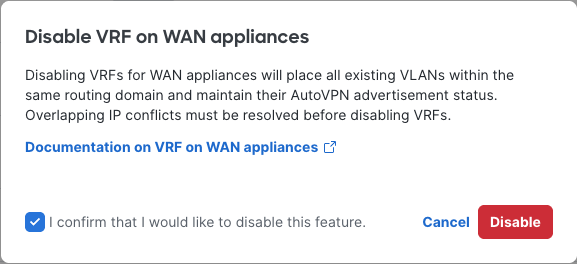
- Click Organization on the left menu, then click on VRFs.
- Click the VRFs for WAN: Enabled.
- Click the checkbox and Disable to confirm.
Monitoring and Troubleshooting
Route Table
The route table will include a VRF column to identify routes that are associated to specific VRFs.
Tools
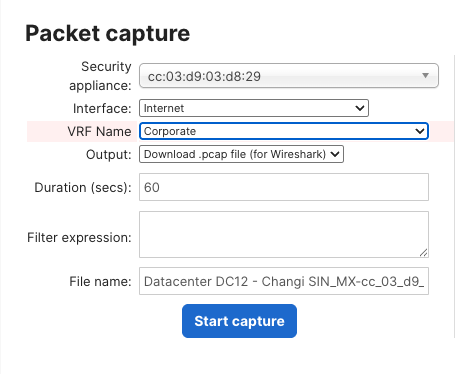
The following tools for WAN appliances have been enhanced to allow for VRF specific troubleshooting.
Packet Capture
Ping

DHCP Leases
VRF aware DHCP lease monitoring is not supported in MX 26.1, but will be supported in MX 26.2.
FAQ
Can I statically or dynamically learn routes within VRFs?
Only local VLAN and AutoVPN routes are populated into VRFs in 26.1. Configured routes will only apply to subnets and next hops within the Default VRF routing domain.
How do VRFs influence security policies, SD-WAN policies, and Group Policy?
Configured security policies found on the Security & SD-WAN Firewall & Site-to-site VPN pages are only enforced on default VRF traffic in 26.1. Similarly, SD-WAN & Traffic shaping policies are only enforced on default VRF traffic in 26.1. Granular policy can be defined via group policy for specific networks or individual clients.
How does Client VPN interact with VRFs?
Client VPN connections will only terminate in the default VRF in 26.1.
Note: Passthrough mode and IPv6 are not supported in version 26.1.