

Troubleshooting BGP Messages in Wireshark
Published by Jagdip Singh and Ranvir Dhillon
Overview
This article explains how to identify and troubleshoot exterior Border Gateway Protocol (eBGP) messages exchanged between two BGP neighbors during adjacency using Wireshark.

The packet captures referenced in this guide are taken between a router and a Cisco Meraki MX WAN appliance connected directly on their WAN interfaces with an eBGP neighbor adjacency configured. For guidance on BGP configuration with Meraki, refer to the documentation on BGP.
BGP uses four main message types visible in packet captures:
- OPEN message: Contains BGP version, BGP autonomous system (AS) number, BGP Identifier, and optional parameters
- UPDATE message: Contains Network Layer Reachability Information (NLRIs), or prefixes, advertised over BGP
- KEEPALIVE message: Maintains the BGP neighbor adjacency; sent every 60 seconds by default
- NOTIFICATION message: Sent when an error is detected on the BGP session, causing the session to close
Environment
The following example packet capture files are referenced throughout this guide:
Troubleshooting BGP OPEN and KEEPALIVE message issues
When two BGP peers such as R1 and an MX are configured for eBGP, they exchange OPEN and KEEPALIVE messages to establish and maintain the BGP neighbor adjacency. Issues during this phase can prevent the BGP session from forming.

- When you expand an OPEN message in Wireshark, the following fields are visible:

- Version: The BGP version the router is using. The current version is BGP version 4. Both BGP nodes negotiate a compatible version; the versions must match.
- Optional Parameters: Used for features such as Multiprotocol BGP (MP-BGP), session authentication, and other extended BGP capabilities.
- Highest IP address on a physical interface
- Highest IP address on a loopback interface
- Manually configured BGP router ID
- BGP Identifier: The local BGP router ID. BGP cannot establish any peering sessions without a router ID assigned. The BGP Identifier is assigned using the following priority order:
- Hold Time: The default hold time is 180 seconds, with KEEPALIVE messages sent every 60 seconds. BGP routers use the lowest configured hold time between peers. If a BGP peer does not receive a KEEPALIVE or UPDATE message within the hold time window, the BGP session ends.
- My AS: The AS number of the BGP router. If both peers share the same AS number, the session is interior BGP (iBGP). If the AS numbers differ, the session is eBGP.
Troubleshooting BGP UPDATE message issues
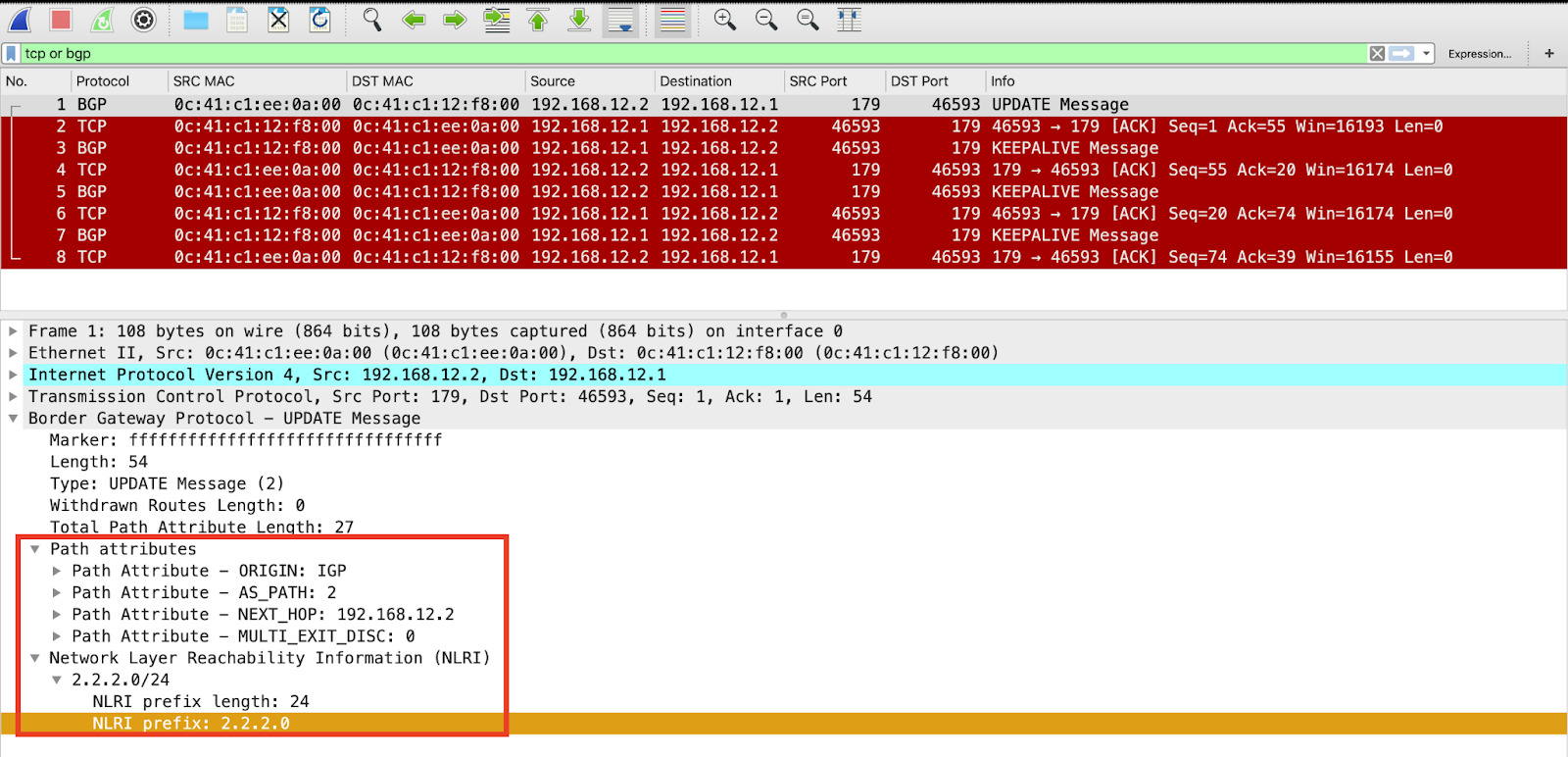
BGP sends UPDATE messages to advertise routing information — including path attributes and prefixes — or to withdraw previously advertised routes. A single UPDATE message can perform both actions simultaneously. UPDATE messages can also serve as KEEPALIVE messages to reduce unnecessary traffic.

When MX2 advertises a prefix such as 2.2.2.0/24, the UPDATE message sent to R1 contains the following:
- Path Attributes: Used for best-path decision making from the neighbor
- NLRI: The prefix being advertised (for example, 2.2.2.0/24)
- Withdrawn NLRIs: Prefixes that have been removed (prefix only, no path attributes)
Troubleshooting BGP NOTIFICATION message issues
BGP sends a NOTIFICATION message when an error is detected on the session, causing the session to close. A common example is the Bad Peer AS notification, which occurs when a BGP peer receives an OPEN message containing an unexpected AS number.
The following example scenario illustrates this error:
- R1 expects neighbor address 192.168.12.2 with a remote AS of 2
- R2 sends an OPEN message advertising AS 200 instead of AS 2
- R1 detects the incorrect AS number and sends a NOTIFICATION message in response
The flow of messages in this scenario is:
- R1 sends an OPEN message.
- R2 sends an OPEN message with incorrect AS 200.
- R1 detects the bad AS number and responds with a NOTIFICATION message.

In Wireshark, the NOTIFICATION message displays under Minor error code (Open message): Bad Peer AS (2).
