

How to Configure Bonjour Forwarding on the MX
Overview
This article explains how to configure Bonjour forwarding on the MX Security Appliance and Z1 Teleworker Gateway.
Bonjour is a Zero Configuration Networking protocol that leverages mDNS to discover other Bonjour-enabled devices on your LAN. Natively, mDNS frames sent by a Bonjour-enabled client set up and maintain inter-client communication within a single broadcast domain, which limits Bonjour to a single subnet. Bonjour forwarding removes this limitation by forwarding the multicast DNS traffic between the client and service VLANs as needed.
The figure below shows a typical mDNS packet advertising Apple Airplay.

Step-by-step instructions
-
In the dashboard, go to Configure > Firewall > Bonjour forwarding.
-
Select Add a Bonjour forwarding rule to view the list of fields you can complete.


-
In the Service VLANs field, choose the VLANs that host a Bonjour service you want to forward. This field displays all eligible VLANs.
-
In the Client VLANs field, choose the VLANs that the Bonjour service is forwarded to and that discovery messages are forwarded from. This field displays all eligible VLANs.
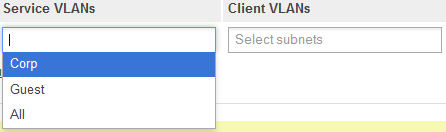
Subnets defined by Client VPN, site-to-site VPN, and static routes are not eligible and do not appear in the Service VLANs or Client VLANs fields.
-
In the Services field, choose the specific Bonjour services to forward, such as Airplay or iChat. Each service you choose is forwarded to all VLANs listed in Client VLANs.

If you do not select a service, that service does not participate in inter-VLAN communication with other Bonjour clients.