

How to Use AI PCAP Analyzer
Overview
After the introduction of Intelligent Capture, collecting packet evidence at the exact time and place of a wireless issue has never been easier. Intelligent Capture helped us move from "no evidence" to inline evidence, automatically, and in context. However, even with the right packet capture (PCAP) in hand, identifying the true source of a problem (and preventing it from happening again) still requires deep protocol expertise and time-consuming manual analysis.
Tools like Wireshark or Omnipeek have long been available, but extracting actionable conclusions from packet captures has historically been limited to a small set of specialists due to complexity and required domain knowledge.
AI PCAP Analyzer addresses this next step in the troubleshooting journey by turning raw packet evidence into understanding and action. By using our data engineering pipeline, data lake, and the knowledge of wireless experts to decode and explain failures, we apply multiple purpose-built models to help determine what happened and why it happened. The result is a guided, plain-language analysis that reduces the complexity of packet troubleshooting and makes advanced wireless diagnostics accessible to more teams—so issues can be triaged and resolved faster, with greater consistency.
AI Notice
At Cisco, Artificial Intelligence (AI) is used to help build an inclusive future for all. Cisco recognizes that applying this technology requires a responsibility to mitigate potential harm. Cisco adheres to the Responsible AI Framework (the "Framework"), which is based on six principles:
- Transparency
- Fairness
- Accountability
- Privacy
- Security
- Reliability
Cisco translates these principles into product development requirements, which form part of the product development lifecycle alongside Security by Design, Privacy by Design, and Human Rights by Design processes.
Any information generated by our trained AI model will be marked with “AI-Generated”.

In the US region, Proactive PCAP files may be used to train the AI/ML. Other regions are not being incuded at this time.
No personal data will be stored in the models, all data is sanitized.
A sanitized capture used for training, will be kept for one year.
Cloud Monitoring for Wireless Access Points does not support the Proactive PCAP feature.
The summary is AI generated and therefore will continue to learn and improve.
Prerequisites
- MR Advanced license
- Proactive PCAP must be enabled as the AI PCAP analysis only applies to proactive pcaps.
- Firmware - Latest MR 32.1 or later.
- Supported AP – Cisco Cloud Managed Wi-Fi 6 AP or newer.
Step-by-step instructions
Accessing AI PCAP via Stored Capture
- Navigate to Assurance > Tools > Packet Capture/Intelligent Capture (Make sure you have selected “For Access Points”).
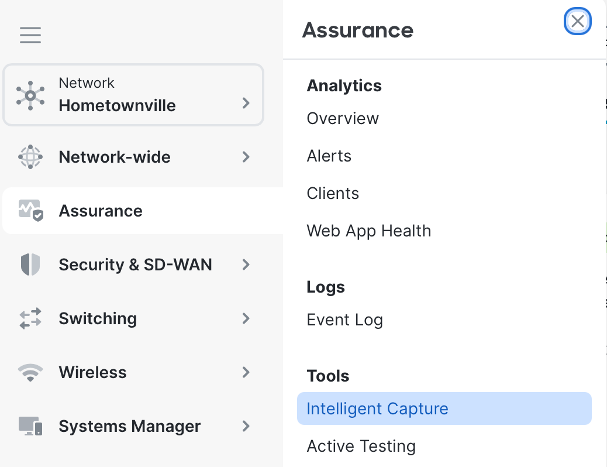
- Then navigate to Stored Captures.

- Select a Proactive Capture to review.
Accessing AI PCAP via Client 360
1. Select the client to review, when the client 360 view opens, if the AI Analyzer has information on the issue, you will see "sparkles" on the icon.

2. While viewing the error select AI PCAP analysis to open a side drawer.
3. From here, you can download the PCAP, view suggested actions to resolve the issue, and have the option to view the packet capture in the embedded analyzer.

Using the PCAP and AI Highlighter
1. Select a stored capture to view.

2. From the webpage, you can analyze the capture manually or enable the AI Highlighter.
When you enable the AI Highlighter toggle, instead of seeing the color scheme based on the profile, the tool will highlight the packets that are exhibiting the issue and provide a summary of what the AI has determined to be the issue.

Using Packet Flow
-
While viewing the AI summary, select Packet Flow to open the packet flow view.
-
Packet Flow provides a visual representation of the step at which the client is failing.

Color scheme
The color scheme used in the OTAWireless profile is based on the MetaGeek Wireshark profile created by Trent Cutler and Joel Crane.
You can download the full profile for use in your local wireshark from Joel's github.
