

Troubleshooting SFP Connectivity Issues
Overview
This article provides a basic understanding and layer 1 troubleshooting steps for when case links do not come ON-LINE while using small form-factor pluggable (SFP) modules.
Do not look straight into an SFP light transmitter hole while it is inserted into a switch. This can cause severe damage to the eye and temporary blindness.
This guide assumes that you are using supported SFP modules and cables with your Cisco Meraki equipment. For more information on the supported accessories, refer to Small-Form Factor Pluggable (SFP) and Stacking Accessories.
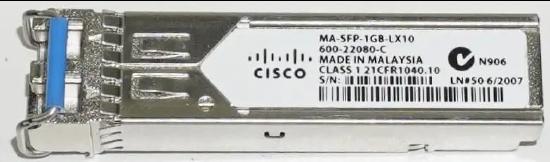
What is an SFP transceiver?
The SFP is a compact, hot-pluggable network interface module used for telecommunication and data communications applications.
How it works
To establish an active link, both SFPs must be the same type, model, and wavelength. Using the same SFP manufacturer at each termination helps avoid compatibility issues.
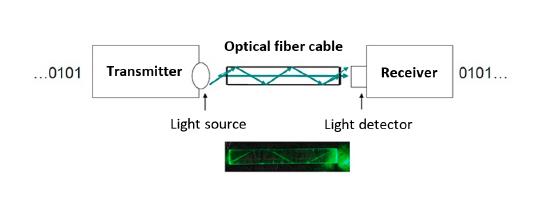
Looking at the SFP from the LC coupler, the left side is the light transmitter and the right side is the light receiver. An optic cable consists of two joined optic fibers. Each optic fiber transmits a signal from the transmitter LC to the receiver LC on the other connected SFP. Both SFPs must receive the wavelength in the receiver LC connection for the link to be established.
Environment
- Wavelength: Meraki SFPs use 850nm, 1310nm, and 1550nm
- 100 Mbit/s SFP: Not supported by any Meraki device
- 1 Gbit/s SFP and 10 Gbit/s SFP+ supported models are listed in the SFP and Stacking Accessories documentation.
- Single-Mode (SM) 1310 and 1550nm wavelength
- Multi-mode (MM) 850nm wavelength
Troubleshooting connectivity issues
- Using SFP and SFP+
- Verify that you are using the same type of SFP.
- If you are using SFP+, verify that the device can supports it.
- Using different types of SFP (for example, SM SFP and MM SFP)
- You can only form a link using the same type of SFP.
- Using the same type of SFP, with a different wavelength
- If the wavelength is different, between SFPs of the same model, the link will not come online.
- Using different types of optic cables that do not match the SFP model (for example, using an SM optic cable with an MM SFP)
- Verify that you are using the correct SM or MM fiber matching the SFP type.
Optical fiber connectors
- Swapped optic cables
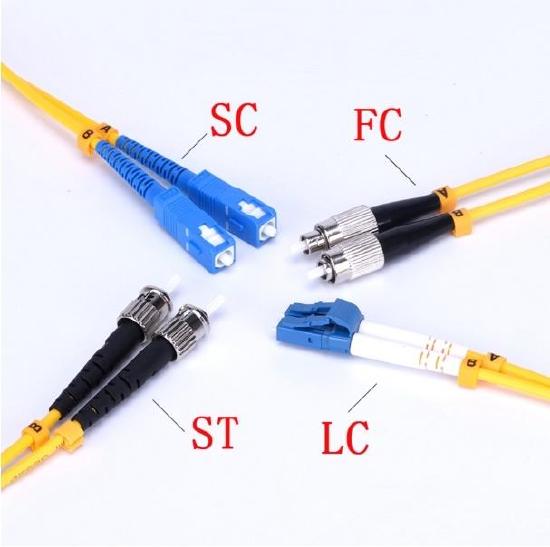
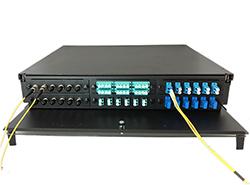
- While using fiber, most connections are made through a patch panel. Human error can occur at the time when optic cables are plugged into the patch panel. Depending on the connector type in the patch panel, (ST, SC, FC, or LC) the user will need to separate the cable and it may get swapped. This will cause the two wavelengths to collide and prevent transmission to the receiver LC connector.
Fiber Optic Patch Panel
- Bent cable
- SFPs transmit light. Fiber cables are designed to bounce light between the borders of the cable. If a cable is bent, the light cannot pass through.
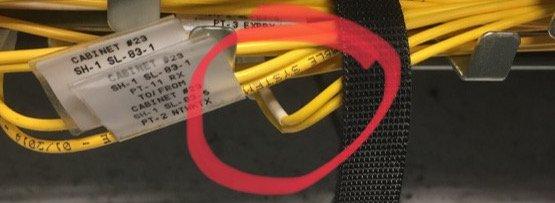
Example of a bent cable
- Dirty Fiber Optic Connectors
- Traditional fiber optic core diameters are approximately 9 microns. Accumulated dust, even at the microscopic level, can cause severe problems.
- Dust on the cable face or in the SFP optic transmitter or receiver may prevent the physical glass-to-glass contact required for proper signal transmission.
- Dirty fiber that blocks the fiber core generates strong back reflections and may impact attenuation (packet loss).
- Refer to the fiber manufacturer's documentation regarding the maximum bend radius.
Note: A common SFP issue encountered is regarding FEC (Forward Error Correction) communication between certain switches. For example, cloud managed Catalyst 9300 Switches with a 10G/25G link to Cisco Nexus switches may not come up due to FEC negotiation issues. The FEC configuration cannot be modified on dashboard, so certain devices may not establish a link with other switches if there are FEC negotiation issues.