

Subscription License Recommendations for Co-Term Organizations
Cisco Meraki provides automated subscription license recommendations to help Co-Term organizations migrate to Subscription Licensing. These recommendations appear directly on the License Information page and vary based on your organization's compliance status and days remaining until license expiration.
Accessing the License Information Page
To view your license recommendation, navigate to Organization > Configure > License Info in the Meraki Dashboard.
How the Recommendation Is Generated
The subscription recommendation is based on your organization's actual deployed devices, not on the licenses or quantities previously claimed. This means the recommendation is right-sized for your current usage. You will not be over-licensed for devices you no longer have, or under-licensed for ones you've added.
The recommendation also intelligently maps your existing hardware models and license tiers to the correct equivalent subscription licenses, ensuring your organization remains compliant in its current deployment state without requiring manual SKU lookup or translation.
Recommendation Views
Depending on your organization's current state, you will see one of the following views.
Within 30 Days of Expiration
If your license expiration is 30 days or fewer away, a subscription SKU recommendation is shown. This is the recommended time to migrate from Co-Term to Subscription Licensing to maintain service continuity.
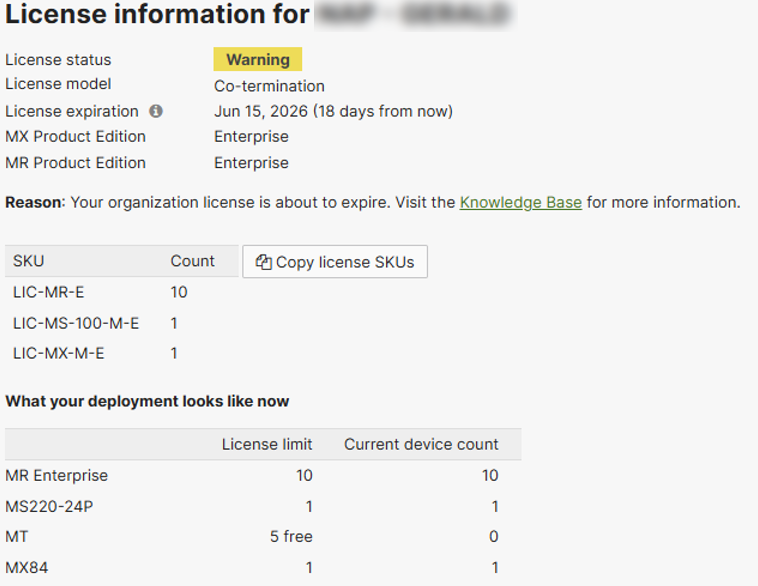
The License Information page displays a table of Order SKUs, quantities, and mapped Subscription SKUs. Select Copy license SKUs to copy the order details to your clipboard in the following format:
Order CISCO-NETWORK-SUB with following SKUs and quantities
LIC-MR-E,10
LIC-MS-100-M-E,1
LIC-MX-M-E,1
Provide this information to your Meraki Sales representative or reseller.
Out of Compliance
If your organization has more devices than your current license covers, a Co-Term SKU recommendation is shown. The appropriate action is to purchase additional Co-Term licenses to bring the organization back into compliance before considering a subscription migration.

More Than 30 Days Until Expiration
If your organization is in compliance and your license expiration is more than 30 days away, no recommendation is shown on the License Information page. If you would like to know what subscription SKUs and quantities you need to migrate to subscriptions, ask the AI Assistant: "What subscription SKUs do I need?"

Additional Resources
- Converting Meraki Co-Term Licensing to Subscription Licensing
- Subscription Licensing Overview
- Contact Meraki Sales for help with your subscription migration.