

Secure Malware Analytics (Threat Grid) Integration
Secure Malware Analytics (Threat Grid) Overview
Cisco Secure Malware Analytics, formally Threat Grid, is a unified threat intelligence and malware analysis platform, which is tightly integrated with Cisco's Advanced Malware Protection (AMP) solution. It performs automated static and dynamic analysis, producing human-readable reports with behavioral indicators for each file submitted. Secure Malware Analytics’s global scalability drives context-rich information that can be consumed directly or via content rich threat intelligence feeds.
Secure Malware Analytics analyzes suspicious files against more than 1500 behavioral indicators and a malware knowledge base sourced from around the world to provide industry-leading accuracy and context-rich threat analytics.
Leveraging Secure Malware Analytics as a part of a comprehensive network security strategy provides:
-
Deeper insights into what malware is doing or attempting to do, how substantial a threat it poses to your organization and how to defend against it
-
Accurate identification of threats with context-focused security analytics
-
Proactive protection for businesses using threat intelligence from Secure Malware Analytics Premium threat feeds
-
Defense against threats originating anywhere using the scale and power of a cloud service that analyzes hundreds of thousands of threats every day
Secure Malware Analytics and Meraki MX Integration
The AMP integration with Meraki MX Security Appliance provides Meraki users with the capability to leverage AMP’s File Reputation and File Retrospection services and benefit from the global intelligence held in the AMP Cloud. The AMP Cloud responds to queries from MX devices on files that are downloaded and returns a file disposition of Clean, Malicious, or Unknown. Malicious files are blocked while Clean and Unknown files are allowed to pass through the MX to the end user. When Secure Malware Analytics integration is enabled, the MX will upload qualified, Unknown files to Secure Malware Analytics for additional static and dynamic analysis. Once the analysis is completed, a detailed report containing the threat score and behavioral indicators that matched the behaviors observed during analysis will be available in the Meraki Security Center. Depending on the severity of behaviors observed and a threat score, Meraki MX administrator may need to initiate further investigation and response. AMP for Endpoints is a complementary integrated endpoint protection solution which provides robust endpoint level visibility and control capabilities for threats that pass the perimeter defenses.
Note: AMP for Endpoints is licensed separately.
The supported file types for the File Analysis service are PE executables, DLLs, PDFs, MS Office Documents (RTF, DOC, PPT(x)). If threat trends indicate that new file types are being exploited, support for them will be transparently added.
Note: The number of daily file submissions which can be made to Secure Malware Analytics is determined by the organization’s Secure Malware Analytics license. Secure Malware Analytics Premium license is required to gain access to Secure Malware Analytics portal with advanced capabilities for malware research and investigations.
Configuration
Prerequisites
-
Ensure that you have a valid Advanced Security license for your MX appliances
-
Ensure that you have a valid Secure Malware Analytics license for MX or a Secure Malware Analytics Premium license
-
Ensure that you have enabled AMP services on your MX appliances
Linking Secure Malware Analytics and Dashboard
Navigate to the Organization > Configure > Settings menu.
Under the Secure Malware Analytics heading, select the Integration type from the drop-down and select Cloud or On-Premise Appliance.
Note: Integration with Secure Malware Analytics Appliance is currently not supported. Once support is declared, this article will be updated.

Next, click the "here" link to access the Secure Malware Analytics portal. When prompted, click ‘Authorize application’ to provide MX devices within your organization with permission to access your Secure Malware Analytics account.

Note: You must be the Secure Malware Analytics organizational admin in order to allow Meraki MXs to access your Secure Malware Analytics account.
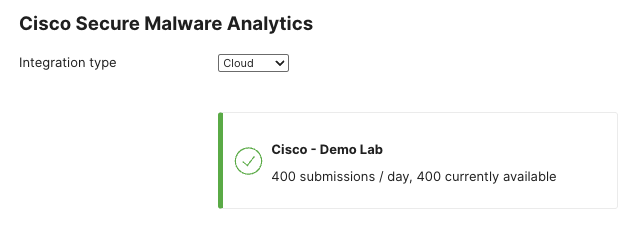
When Secure Malware Analytics and the Meraki Dashboard are successfully linked, you will be able to see the daily file submission limit for your organization and how many are currently available.
Enable Secure Malware Analytics Submissions
Navigate to the Security & SD-WAN > Configure > Threat protection page.
Under the Secure Malware Analytics heading, set the mode to Enabled. If desired the rate limit can also be configured to limit the number of file submissions that the network can submit to Secure Malware Analytics for analysis in a 24-hour period. The rate limit cannot exceed the maximum allowed daily submissions.

Reporting
To view the results of Secure Malware Analytics analysis, navigate to the Security & SD-WAN > Monitor > Security center page. Within the Security Center, select the Events view.
Files that have been submitted for analysis to Secure Malware Analytics will have the threat score and a list of associated behavioral indicators available in the Event view.

Clicking the file name link will pull up an info-card that will provide additional information about the file. This will include more specific information about any of the behavioral indicators that matched to behaviors observed during Secure Malware Analytics analysis.

Secure Malware Analytics Portal
Secure Malware Analytics Premium customers can also access the Secure Malware Analytics Premium Cloud portal, which allows users to perform detailed analysis and threat intelligence searches on samples analyzed by Secure Malware Analytics. Users can access the portal through a web interface or via a set of robust APIs, which Secure Malware Analytics provides. Secure Malware Analytics also provides curated feeds which can be used to augment existing customer threat intelligence platforms.
The Secure Malware Analytics Premium portal allows users to interact directly with live malware using the “Glove Box” feature and to view recordings of malware being executed in the virtual environment. Playbooks, process maps, JSON reports, sample runtime adjustments and many other features are available to Secure Malware Analytics Premium users.
Finally, the Secure Malware Analytics Premium portal offers users an organizational view of Secure Malware Analytics cloud submissions across AMP and Secure Malware Analytics enabled devices in your organization.
