

PoE Support on Cloud-Managed Switching (MS and C9000)
Learn more with this free online training course on the Networking Learning Hub:
Click 日本語 for Japanese
The IEEE 802.3af (PoE) standard supports the delivery of power over Ethernet up to 15.4W per port that may be used to deliver power to a variety of devices. However, only 12.95W is assured to be available at the powered device as some power is dissipated in the cable as overhead.
The IEEE 802.3at (PoE+) standard supports up to 25.5W of power on the ports, allowing devices that require more than 15.4W to power on when connected to the PoE+ ports.
802.3bt is a standardization of UPOE that introduces support for up to 60W of power on a switchport using all 4 pairs for power, allowing devices that require more than 25.5W to power on when connected. (802.3bt is enabled by default on MS390 UPOE Models starting with MS15).
Supported Protocols
The cloud-managed switches (MS and C9000) supports current-based PoE classification. Layer 2 (LLDP/CDP) is also supported on switches with newer firmware.
To ensure that you are using the latest stable firmware version, please refer to our Firmware FAQ for instructions.
Current Classification
Based on the classification current used by the device, the MS switch will classify the device as a Class 0, 1, 2, 3 or 4 type device and apply the proper standards-defined behaviors to the port.
| Class | Usage | Classification current [mA] |
Power range [Watt] |
Class description |
|---|---|---|---|---|
| 0 | Default | 0–4 | 0.44–12.94 | Classification unimplemented |
| 1 | Optional | 9–12 | 0.44–3.84 | Very Low power |
| 2 | Optional | 17–20 | 3.84–6.49 | Low power |
| 3 | Optional | 26–30 | 6.49–12.95 | Mid power |
| 4 | Valid for IEEE 802.3at Type 2 or later devices; not allowed for 802.3af Type 1 devices | 36–44 | 12.95–25.50 | High power |
| 5 | Valid for IEEE 802.3bt Type 3 or Type 4 devices using four-pair power |
Multi-event classification¹ |
25.5–40 |
Four-pair extended power |
| 6 | Valid for IEEE 802.3bt Type 3 or Type 4 devices using four-pair power |
Multi-event classification¹ |
40–51 |
Maximum Type 3 power |
| 7 | Valid only for IEEE 802.3bt Type 4 devices using four-pair power |
Multi-event classification¹ |
51–62 |
Four-pair high power |
| 8 | Valid only for IEEE 802.3bt Type 4 devices using four-pair power |
Multi-event classification¹ |
62–71.3 |
Maximum Type 4 power |
¹ Classes 5–8 are identified through a sequence of physical-classification events, so they do not have a single unique classification-current range like Classes 0–4.
PoE Power Budgeting
Meraki Switches (MS)
Meraki switches will budget based on the PoE device classification, the budget is allowed to exceed available power as it's used to gauge overall power that might be consumed on the switch. Devices will continue to be powered until total power consumption goes over the available amount of power.** In this case the lowest port numbers take precedence and power will be pulled from the highest ports thus denying them power.
For more information on the available PoE budget per MS model, please see the MS Family Datasheet.
For more information on PoE budgeting with the combined power mode, please see Combined Power on MS Devices.
C9000 in Cloud Configuration Mode
For power options and available PoE budget, please refer to MS390 datasheet, and C9000-M respective datasheet here.
Default
For MS390 and cloud-managed C9000 switches (in cloud configuration mode), once total power requested goes over the available amount of power, new devices will be denied power.
Flexible PoE
Flexible PoE is a new feature on C9000 switches when manage in cloud configuration mode. This feature allows budget oversubscription, devices will continue power up until the switch’s total PoE capacity is reached.
- Flexible Deployment: Enable network-wide with configurable exceptions for specific switches or stacks.
- Real-time Monitoring: Track PoE budget and consumption via the Device Health tab.
- Load Shedding: If capacity is exceeded, ports are disabled starting from the highest-numbered port (lower-numbered ports retain priority).
- Flexible PoE is not available when StackPower is in use.
- Flexible PoE is not supported on network templates.
Supported Models and Minimum Supported IOS XE Version
| Product Family | Minimum OS Version |
| MS390, C9300, and C9350 | IOS XE 26.1.2 (in early access 1) |
1 Once upgrade networks to minimum OS version, go to early access page to opt in the feature.

How to Configure
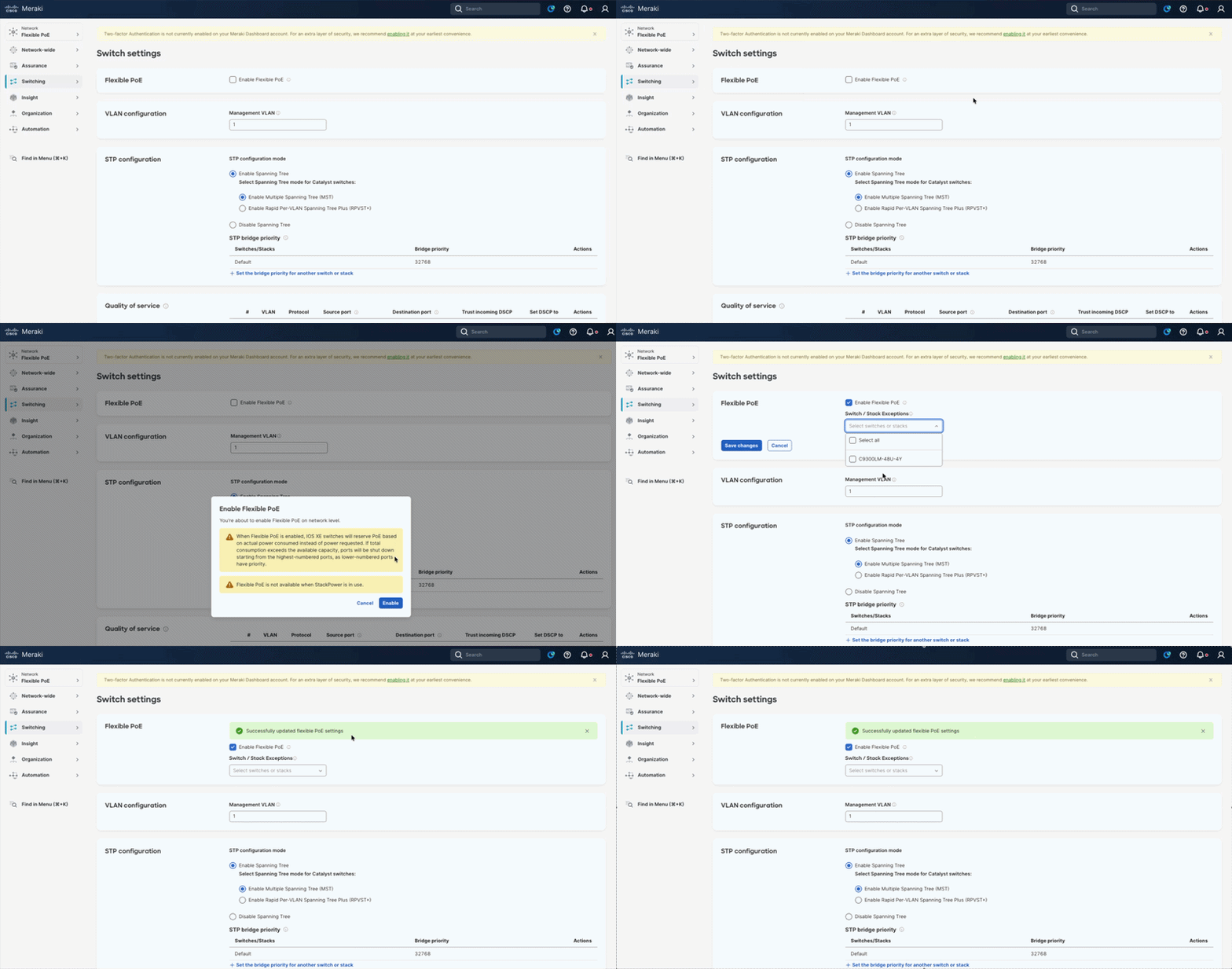
Navigate to Switching tab > Switch Settings page >Flexible PoE section. Click 'Enable Flexible PoE' > A pop up window will appear with relevant information. Review the details and click 'Enable' to proceed.
On Flexible PoE section, add any required switch or stack exceptions before select 'save changes'.
Important: Disable Flexible PoE in the switch settings before downgrading to an IOS XE version prior to 26.1.2.
How to Verify if Flexible PoE is enabled on a switch
Navigate to Switching tab > select target Switches. On switch detail page, click on Cloud CLI tab > Launch terminal. In terminal, use show platform software ilpower system command to review status.
Show platform software ilpower system command:Show platform software ilp sys <switch id number
Output Example:
C9300LM-48U-4Y>show platform software ilp sys 1
ILP System Configuration
Slot: 1
ILP Supported: Yes
Total Power: 591000
Used Power: 0
Initialization Done: Yes
Post Done: Yes
Post Result Logged: No
Post Result: Success
Power Summary:
Module: 0
Power Total: 394000
Power Used: 0
Power Threshold: 0
Operation Status: On
Pool: 1
Pool Valid: Yes
Total Power: 591000
Power Usage: 0
Flexible PoE Configured: Yes
Flexible PoE Enabled: Yes
C9300LM-48U-4Y>
Monitoring PoE on Dashboard
When PoE devices are connected to the ports of the MS PoE switches, the ports on the switches are labeled with a lightning bolt. This symbol indicates that power from these interfaces is being supplied from the switch (PSE) to the powered device(s) (PD). See an example below:
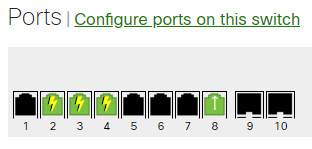
PoE consumption on the switch can be monitored live, including both a consumption and budgeting value as well as port-specific information. Consumption and budgeting details can be located under Switching > Monitor > Switches > Select the desired switch > Select the "Power" tab. Port-specific details can be located by selecting the specific switch port and scrolling down to the "Status" section. For more information on available PoE budget, please see the MS Family Datasheet.
PoE Underload Alerts
A PoE underload event occurs when a PoE power consuming device uses less power than the specification allows for a long enough period of time. This can happen if a PoE device is not operating correctly or if a device powers down too slowly.