Status Icon Meanings
Status icon meanings
In the Cisco Meraki dashboard, you can find status information from the colored icons representing each device on the following pages:
- Wireless > Monitor > Access Points
- Switching > Monitor > Switches
- Security & SD-WAN > Monitor > Appliance Status
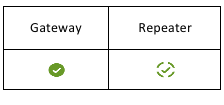
The icons indicate what a given device is, whether the device is active, and whether an access point is in repeater mode. Additional information is also available by hovering the mouse over an icon.
Device status colors
Each device icon displays in one of four colors indicating the current status of that device:
Green: The device is currently online and has no alerts
Yellow: The device is currently online but has one or more active alerts
Red: The device is currently offline and is inaccessible by the Cisco Meraki dashboard
Grey: The device is currently offline and has been offline for at least a week (dormant).

These color indicators help narrow down the type of device issue:
- A device showing a red offline status likely cannot reach its gateway or the Meraki dashboard.
- A device showing a yellow alert status will often have additional details on the device details page. Examples include IP address conflicts or disconnection from RADIUS.
Client status icons
Clients display as connected or disconnected using the same color logic:
- Green: The client is currently connected.
- Grey: The client is currently disconnected.

Access point states
Access points display in two states depending on their operating mode (gateway or repeater)