

Cisco Meraki US Government Region EA Subscription Experience
Overview
Cisco Meraki US Government Region customers now have access to the full subscription experience in the Meraki Dashboard. This enhancement enables Cisco Meraki US Government Region organizations to leverage Enterprise Agreements (EA) with the same subscription management capabilities available to commercial customers. Additionally, a single Enterprise Agreement can now be shared across both Cisco Meraki US Government Region and commercial networks, providing greater flexibility in license management.
Key Benefits
- Access to EA subscription experience for Cisco Meraki US Government Region customers
- Ability to share a single EA across Cisco Meraki US Government Region and commercial networks
- Suite utilization tracking and management
- Network-level subscription visibility and control
- Simplified license management across hybrid environments
What's New for Cisco Meraki US Government Region
Previously, Cisco Meraki US Government Region customers operated under a different licensing experience. With this update, Cisco Meraki US Government Region customers gain access to the same subscription management features as commercial customers, including:
- Subscription & License Info page with full EA details
- Network-level subscription binding and management
- Suite utilization metrics and tracking
- Ability to claim and manage devices through the subscription interface
- Network allocation and utilization monitoring
Viewing Your Enterprise Agreement
Step 1: Navigate to Subscription & License Info
From your Cisco Meraki US Government Region organization, navigate to Organization > Subscription & License Info. This page displays all Enterprise Agreements associated with your organization.

Here you can see your Enterprise Agreement subscription with:
- Subscription name (e.g., GENSURByqnCisco Meraki US Government RegionTest)
- Subscription type (Enterprise Agreement)
- Status (Active)
- End date
- Number of networks bound to the subscription
- Utilization percentage
Step 2: View Subscription Details
Click on your EA subscription name to view detailed information. This opens the subscription details page showing suite utilization, network associations, and license allocation.
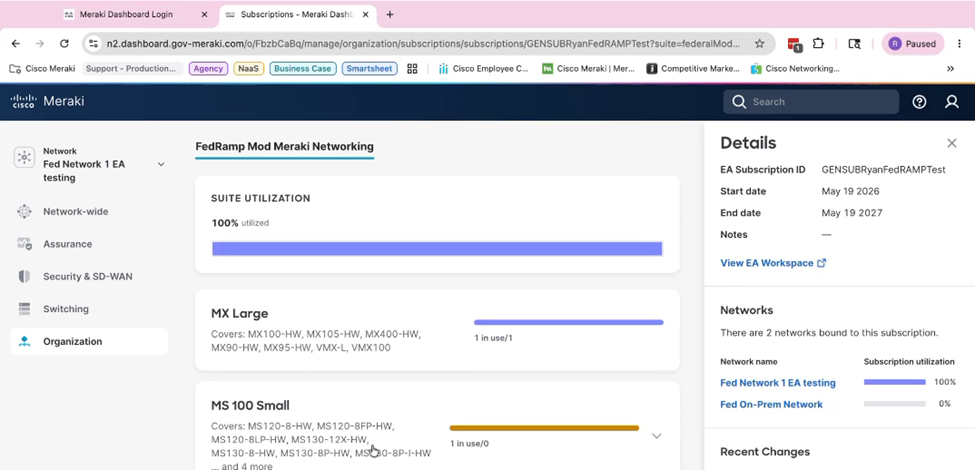
The Details panel shows:
- EA Subscription ID
- Start date and End date
- Link to View EA Workspace (for additional management)
- Networks bound to this subscription with utilization breakdown
- Recent changes history
Sharing an EA Across Cisco Meraki US Government Region and Commercial Networks
One of the most powerful features of this update is the ability to use a single EA across both Cisco Meraki US Government Region and commercial organizations. This provides:
- Centralized license pool management
- Flexible allocation between Cisco Meraki US Government Region and commercial deployments
- Simplified procurement and contract management
- Cost optimization through shared resource utilization
When networks from both Cisco Meraki US Government Region and commercial organizations are bound to the same EA, the EA workspace subscription dashboard displays aggregated utilization across all bound networks, regardless of organization type. However, within the Meraki Dashboard, consumption data is displayed only for the networks associated with your specific cluster.
Best Practices
To maximize the value of your Cisco Meraki US Government Region Enterprise Agreement subscription:
- Regularly monitor suite utilization to ensure optimal license allocation
- Use the EA Workspace link for combined subscription management and reporting
- Plan network creation and device claims based on available suite capacity
Additional Resources
For more information about Enterprise Agreements and subscription management:
- Enterprise Agreement Suite and Organization Utilization - EA Suite and Organization Utilization
- Subscription Feature Tiers Documentation - Subscription Feature Tiers Documentation
- EA Workspace User Guide
Support
If you have questions about Cisco Meraki US Government Region Enterprise Agreement subscriptions or need assistance with subscription management, please contact Cisco Meraki Support or reach out to your account team.