

Device Backward Compatibility: Customer Experience, License Eligibility, and Management Guidance
Overview
Device Backward Compatibility unlocks more value from Unified Licensing by extending Unified license coverage to eligible older-generation hardware.
Customers gain greater investment protection, deployment flexibility, and a simpler path to Unified Licensing. They can support new Unified hardware and eligible older hardware under one licensing strategy—without replacing working devices early or purchasing duplicate licenses solely because the hardware is older.
Deployment and purchase guidance
- Greenfield deployments: Purchase Unified licenses for Unified hardware and any eligible older-generation hardware.
- Brownfield deployments: Existing legacy licenses can continue to be used. Customers should transition to Unified licenses at renewal, creating a simpler and more consistent licensing experience over time.
How licenses are applied
- Unified hardware uses only Unified licenses. It cannot consume licenses from a legacy pool.
- Eligible older-generation hardware can use either legacy or Unified licenses.
For eligible older-generation hardware, licenses are applied in this order:
- Legacy license first: The device uses an available license from its legacy pool. For example, an eligible MR device uses LIC-MR when LIC-MR capacity is available.
- Unified license fallback: If the legacy pool has no capacity, the device uses the corresponding Unified license. For example, eligible MR consumption can use LIC-CW. For Enterprise Agreements, eligible older-generation devices continue using the legacy pool even when it is over capacity. This preserves consistent overage billing.
- Return to the legacy pool: If legacy capacity becomes available later, the eligible older-generation device moves back to the legacy pool automatically. This frees Unified license capacity for Unified hardware, which can only use Unified licenses.
This prioritization uses all available licenses efficiently while protecting Unified capacity for hardware that has no legacy-license option.
What customers should expect through December 2026
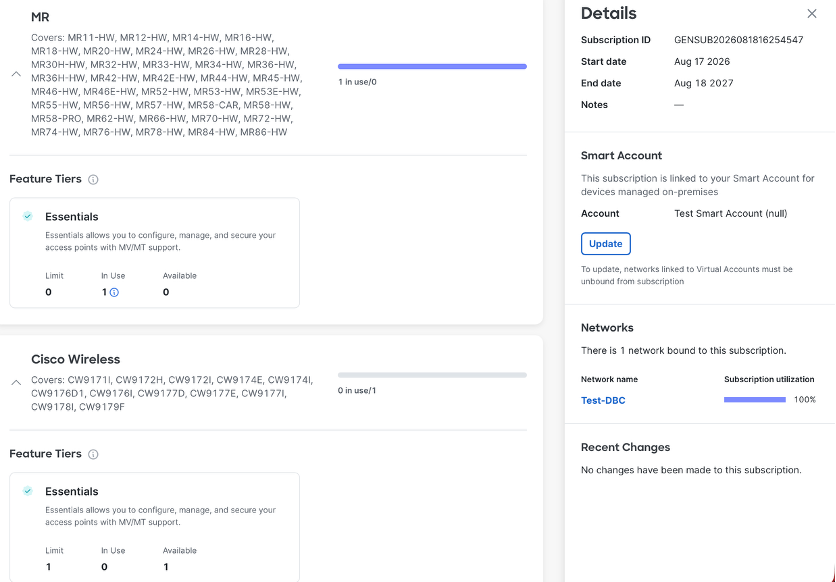
The Meraki Dashboard Subscriptions and License Info page may not yet display this prioritization correctly.
For example, LIC-MR may appear overconsumed while available LIC-CW capacity appears unused. This is a temporary reporting mismatch. The customer remains compliant for this specific mismatch when an active, available Unified license covers the same product family.
Customer Action
Required Action
No action is required solely because License Utilization shows legacy-license over consumption while Unified capacity is available.
License Purchase Guidance
Expansion or new license purchases
- Purchase Unified licenses for new Unified hardware and eligible older-generation hardware.
- Select the Unified entitlement mapped to the device family, category, size, and feature tier.
- Eligible older-generation hardware may continue to consume available legacy licenses first, but customers should not purchase additional legacy licenses for expansion.
Renewal
- Brownfield customers should transition existing legacy-license coverage to Unified licenses at renewal.
- The renewed Unified subscription should cover both Unified hardware and eligible older-generation hardware.
- This creates a simpler licensing model and supports the long-term transition away from separate DNA and Meraki legacy licenses.
Device Management Mode Experience
Device Backward Compatibility expands license coverage while preserving the management experience designed for each hardware generation.
Using a Unified license does not convert a cloud-native device into an on-premises device—or an on-premises-native device into a cloud-managed device. Existing deployment and management modes remain unchanged.
Newly converged or Unified hardware: existing Dashboard flow
- Has a Meraki Cloud ID and is compatible with Dashboard onboarding.
- Is Unified Hardware and Can operate on-premises through Network-wide > Management Mode.
- Uses its eligible PID and mapped Unified license entitlement in Dashboard.
Older legacy Meraki hardware: existing Dashboard flow
- Has a Meraki Cloud ID and remains onboarded to Meraki Dashboard.
- Is cloud-native and cannot operate on-premises through Network-wide > Management Mode.
- Continues to use its existing Dashboard management experience.
- Legacy and Unified license prioritization is handled independently within Dashboard.
Older legacy Catalyst hardware: existing Catalyst Center and CSSM flow
- Does not have a Meraki Cloud ID and is not expected to onboard or appear in Dashboard.
- Does not use Network-wide > Management Mode.
- Remains managed through Catalyst Center or CSSM.
- Licensing and applicable Unified coverage are handled independently through CSSM.
Additional Information
Eligible Devices and Unified License Mappings
Device eligibility is determined by the exact hardware PID. Use the mappings below to identify the Unified license required for each eligible device.
E/A means the customer must select the corresponding Essentials (-E) or Advantage (-A) license.
Wireless Eligibility
- All MR models are eligible for LIC-CW coverage. Eligible MR consumption uses LIC-MR first and falls back to LIC-CW when LIC-MR capacity is unavailable.
- All CW models use LIC-CW only.
Switching Eligibility
Catalyst -M Models
Access 1 – Medium
Mapped Unified license: LIC-CS-AC1-M-E/A
C9300X-12Y-M, C9300-24S-M, C9300-24T-M, C9300-24P-M, C9300-24U-M, C9300-24UX-M, C9300X-24Y-M, C9300X-24HX-M, C9300L-24T-4X-M, C9300L-24P-4X-M, C9300L-24UXG-4X-M, C9300LM-24U-4Y-M
Access 1 – Large
Mapped Unified license: LIC-CS-AC1-L-E/A
C9300-48S-M, C9300-48T-M, C9300-48P-M, C9300-48U-M, C9300-48UXM-M, C9300-48UN-M, C9300X-48TX-M, C9300X-48HX-M, C9300X-48HXN-M, C9300L-48T-4X-M, C9300L-48P-4X-M, C9300L-48PF-4X-M, C9300L-48UXG-4X-M, C9300LM-48UX-4Y-M, C9300LM-48U-4Y-M, C9300LM-48T-4Y-M
Legacy Meraki MS Models
The following legacy MS PIDs can use their mapped Unified license in existing brownfield deployments. They are not eligible for greenfield deployments.
Access 2 – Medium
Mapped Unified license: LIC-CS-AC2-M-E/A
Eligibility: Brownfield only
PIDs: 8
MS320-24-HW, MS320-24P-HW, MS210-24-HW, MS210-24P-HW, MS225-24-HW, MS225-24P-HW, MS250-24-HW, MS250-24P-HW
Access 2 – Large
Mapped Unified license: LIC-CS-AC2-L-E/A
Eligibility: Brownfield only
PIDs: 12
MS320-48-HW, MS320-48LP-HW, MS320-48FP-HW, MS210-48-HW, MS210-48LP-HW, MS210-48FP-HW, MS225-48-HW, MS225-48LP-HW, MS225-48FP-HW, MS250-48-HW, MS250-48LP-HW, MS250-48FP-HW
Access 1 – Medium
Mapped Unified license: LIC-CS-AC1-M-E/A
Eligibility: Brownfield only
PIDs: 12
MS350-24-HW, MS350-24P-HW, MS350-24X-HW, MS355-24X-HW, MS355-24X2-HW, MS390-24-HW, MS390-24P-HW, MS390-24U-HW, MS390-24UX-HW, MS420-24-HW, MS410-16-HW, MS425-16-HW
Access 1 – Large
Mapped Unified license: LIC-CS-AC1-L-E/A
Eligibility: Brownfield only
PIDs: 14
MS350-48-HW, MS350-48LP-HW, MS350-48FP-HW, MS355-48X-HW, MS355-48X2-HW, MS390-48-HW, MS390-48P-HW, MS390-48U-HW, MS390-48UX-HW, MS390-48UX2-HW, MS420-48-HW, MS410-32-HW, MS425-32-HW, MS450-12-HW