

Migrating Switches From CS Firmware to IOS XE Firmware
On CS firmware, the management IP for catalyst switches configured on the switch page’s sidebar (displayed as LAN IP) is pushed to the container running on the device. This IP essentially acts like an out of band management interface to maintain the switch management connectivity to the dashboard. On the other hand, the L3 interfaces (SVIs) configured on Switching > Configure > Routing & DHCP page are used for data traffic on the switch.
On Cloud Management with IOS-XE, the management IP behavior is inherited from the traditional IOS-XE firmware behavior. One of the L3 interfaces (SVIs) on the Switching > Configure > Routing & DHCP page can now be used as the management IP interface.
Due to this change in management IP behavior, to avoid unexpected loss of connectivity to the switch management or the data traffic, it is highly recommended to review upgrade behaviors and recommendations before migrating your switches from a CS firmware to IOS-XE firmware.
Migrating Layer 3 Switches: Pre-configure L3 switches to reduce reconfiguration after upgrade
We recommend pre-configuring your switch to mirror Scenario 4a prior to migrating the switch. This will provide the best possible upgrade experience.
Key points:
-
Ensure that an uplink SVI (VLAN interface) exists on the Routing & DHCP page, in the same subnet as your management interface.
-
We recommend moving your management interface into the same VLAN as the switch's default route to the Internet.
-
If the default route to the Internet is via VLAN 10, move the management interface of the switch to VLAN 10.
-
Make sure the default gateway of the management interface is the same as the default gateway in the switch routing table.
-
Make sure DNS is configured properly.
-
-
-
Use static IP address if possible
-
Configure the management interface with a static IP address.
-
-
RADIUS / Syslog / SNMP
-
Make sure RADIUS / Syslog / SNMP can be sourced from either the management or SVI IP addresses.
-
With CS firmware, that traffic will source from the management interface, post-upgrade it will now source from your uplink SVI.
-
If AMI (Alternative Management Interface) is being used, make sure that SVI is created for that AMI VLAN.
-
Is Your Switch a Layer 3 Switch?
This section provides instructions on how you can gather information about your current Layer 2 and Layer 3 setup on your CS firmware-based switches that you can correlate with one of the scenarios listed in the next section.
- Navigate to Switching > Monitor > Switches > click on one of the switches
- On the sidebar, take a note of LAN IP section. Following is the screenshot of an example switch configuration
This is the management IP of the switch that was pushed to the CS firmware switch container as discussed in the earlier section. Take a note of IP address, Type (DHCP/Static), Interface (VLAN number) and Gateway on your switch. In this example, the Management IP is using DHCP IP address on VLAN 10 with a 192.168.10.254 gateway IP address.

- Navigate to Switching > Configure > Routing & DHCP. In the following example, the list shows configured L3 interfaces (SVIs) on each switch within this network, used for data traffic as described in the previous section. The highlighted entry is the switch that we looked at earlier. You may have no SVIs which means it is a L2 switch.
In this example, there is only one L3 interface (SVI) for this switch, which is on VLAN 20.

- On the same Routing & DHCP page, scroll down to Static routes section and make a note of the default route.
In this example, the default route’s next hop IP address is 192.168.20.254
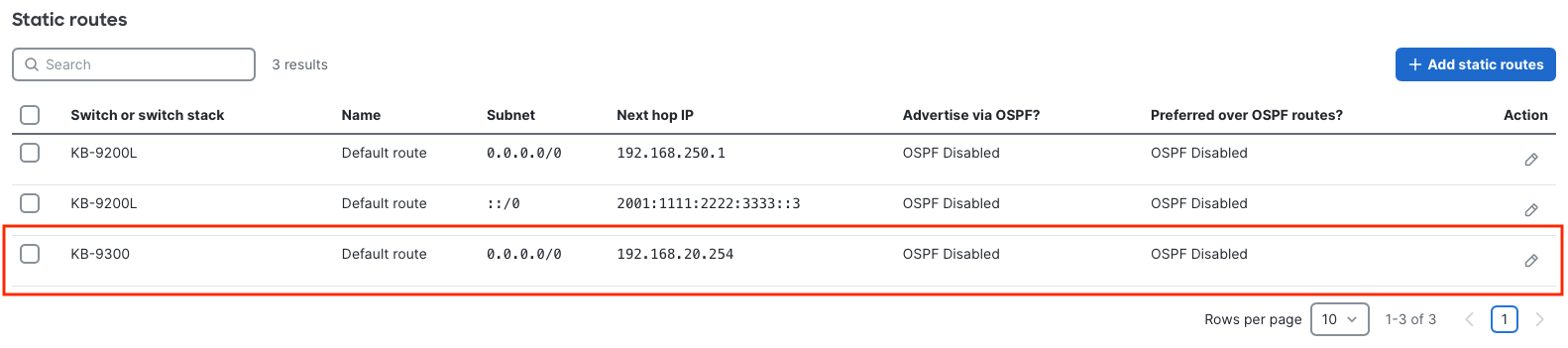
- In this example setup, following is the current configuration of switch running CS firmware:
- Management IP (displayed as LAN IP on side bar): Running on the container. Uses DHCP on VLAN 10 with a gateway of 192.168.10.254
- SVIs: Only one SVI on VLAN 20, which doesn’t overlap with Management IP subnet that is on VLAN 10.
- Default route: Next hop IP address of default route is 192.168.20.254, which is on VLAN 20. This IP address is not the same as Management IP gateway (192.168.10.254)
- Corresponding scenario (discussed below): With the above information, we can see that this example scenario corresponds to the following scenario documented in the next section: Scenario 1 - Management via DHCP with no subnet overlap with SVIs and Management IP gateway ≠ Default route next hop on Routing & DHCP page.
Migrating a Layer 2 Switch – Static and DHCP Management IP
Pre-migration setup – on CS firmware:
If there are no L3 interfaces (SVIs) for your switch on Switching > Configure > Routing & DHCP page, it is a Layer 2 switch.
Alternate Management Interface (AMI) configuration now requires a dedicated L3 SVI interface to be created on the switch. It is no longer configured from the switches side-bar. If you have configured the network to support AMI on a VLAN (ex. VLAN10), then every switch in that network must have a L3 SVI on the specified VLAN in order to use that interface as an AMI. If there is no L3 SVI interface on a switch that matches the AMI VLAN, then the management/uplink interface will be used as default.
Post-migration behavior – on IOS-XE firmware:
Regardless of whether the Management IP on your Layer 2 switch running CS firmware is configured as static or obtained via DHCP, after migrating to IOS-XE, the switch will inherit the Management IP configuration from the CS firmware. Specifically, the management interface settings transition to a Layer 3 interface (SVI) in IOS-XE.
DHCP management interfaces convert to DHCP L3 interfaces that are only visible on the Cloud CLI and static management interfaces convert to static L3 interfaces (SVIs) that are also only visible on the Cloud CLI. The default route and its next hop IP address is also retained.

Migrating a Layer 3 Switch
Following are several Layer 3 switch scenarios. Please use the instructions in Migrating Switches From CS Firmware to IOS XE Firmware to determine the applicable scenario for your switches.
Alternate Management Interface (AMI) configuration now requires a dedicated L3 SVI interface to be created on the switch. It is no longer configured from the switches side-bar. If you have configured the network to support AMI on a VLAN (ex. VLAN10), then every switch in that network must have a L3 SVI on the specified VLAN in order to use that interface as an AMI. If there is no L3 SVI interface on a switch that matches the AMI VLAN, then the management/uplink interface will be used as default.
Scenario 1: Management IP via DHCP with no subnet overlap with the SVIs
Pre-migration setup – on CS firmware:
The switch on CS firmware obtains the management IP (displayed as LAN IP on side bar) via DHCP and the DHCP subnet does not overlap with any L3 interfaces (SVIs) on Routing & DHCP page. Also, gateway IP on the Management VLAN ≠ Default route next hop on the Routing & DHCP page.
Post-migration behavior – on IOS-XE firmware:
- Switch Management VLAN: The switch uses the same DHCP VLAN for Management. Note that, while the Routing & DHCP page doesn't show a static L3 interface (SVI) for this VLAN, the running configuration on the Cloud CLI will display DHCP IP details for it.
KB-9300#show run int vlan 10
Building configuration...
Current configuration : 196 bytes
!
interface Vlan10
..
ip address dhcp
..
KB-9300#show ip interface brief | include Vlan10
Vlan10 192.168.10.5 YES NVRAM up up
- Default route: The original default route next hop is replaced with management VLAN’s DHCP gateway - The Cloud CLI reflects this, showing the DHCP gateway as the default route’s next hop. Routing & DHCP page still shows default route with old next hop IP address (that is unused) that was previously used on CS firmware.
Note: Even if you change the default route’s next hop on the dashboard, the device will still use the DHCP gateway as the next hop for default route - the change won’t apply to the device.

Impact and recommendations:
Due to change in default route’s next hop IP address, there may be a loss of connectivity to data traffic, especially if your original default route’s next hop (used for data traffic) and the next hop inherited from Management IP’s DHCP gateway are not on the same device.
Before proceeding with the upgrade, while the switch is on CS firmware, ensure that the Management IP DHCP gateway (from the example image above, 192.168.10.254) and default route’s next hop (192.168.20.254) are on the same upstream device.
The ability to use different next hop addresses for management and data will be available soon.
Scenario 2: Management IP via DHCP with subnet overlap with one of the SVIs
Pre-migration setup – on CS firmware:
The switch on CS firmware obtains the management IP (displayed as LAN IP on side bar) via DHCP and the DHCP subnet overlaps with one of the L3 interfaces (SVIs) on Routing & DHCP page.
Post-migration behavior – on IOS-XE firmware:
- Switch Management VLAN: The switch uses the same DHCP VLAN for Management and ignores the conflicting static L3 interface (SVI) on the same VLAN that was configured on Routing & DHCP page. Note that, while the Routing & DHCP page still shows a static L3 interface (SVI) for this VLAN, the running configuration on the Cloud CLI will display DHCP IP details for it.
KB-9300#show run int vlan 10
Building configuration...
Current configuration : 196 bytes
!
interface Vlan10
..
ip address dhcp
..
KB-9300#show ip interface brief | include Vlan10
Vlan10 192.168.10.5 YES NVRAM up up
- Default route: Prior to the migration, if management VLAN’s DHCP gateway ≠ Default route next hop on Routing & DHCP page, the original next hop will be replaced by Management VLAN’s DHCP gateway - the Cloud CLI reflects this, showing the DHCP gateway as the default route’s next hop. Routing & DHCP page still shows default route with old next hop IP address that was previously used on CS firmware.
Note: Even if you change the default route’s next hop on the dashboard, the device will still use the DHCP gateway as the next hop for default route - the change won’t apply to the device.

Impact and recommendations
Since the switch uses the same DHCP VLAN for Management and ignores the conflicting static L3 interface (SVI) IP, it may impact services such as RADIUS, Syslog, SNMP etc., (that use the original SVI IP) and other routing behavior if the original SVI IP is used as next hop on other devices.
Additionally, due to change in default route’s next hop IP address, there may be a loss of connectivity to data traffic, especially if your original default route’s next hop (used for data traffic) and the next hop inherited from Management IP’s DHCP gateway are not on the same device.
Before proceeding with the upgrade, while the switch is on CS firmware, It is highly recommended to resolve the overlap to align the setup with Scenario 1 and ensure that the Management IP DHCP gateway (from the example image above, 192.168.10.254) and default route’s next hop (192.168.20.254) are on the same upstream device.
The ability to use different next hop addresses for management and data will be available soon.
Scenario 3: Management IP via Static with no subnet overlap with the SVIs
Pre-migration setup – on CS firmware:
The switch on CS firmware obtains the management IP (displayed as LAN IP on side bar) via Static assignment and the Static IP subnet does not overlap with any L3 interfaces (SVIs) on Routing & DHCP page. Also, gateway IP on the Management VLAN ≠ Default route next hop on the Routing & DHCP page.
Post-migration behavior – on IOS-XE firmware:
- Switch Management VLAN: The switch uses the same Static IP for Management. Note that, while the Routing & DHCP page doesn't show a static L3 interface (SVI) for this VLAN, the running configuration on the Cloud CLI will display the original Management VLAN’s Static IP details for it.
KB-9300#show run int vlan 10
Building configuration...
Current configuration : 196 bytes
!
interface Vlan10
..
ip address 192.168.10.5 255.255.255.0
..
End
- Default route: A new default route is created with Management VLAN’s gateway as the next hop - the Cloud CLI reflects this, showing both the routes. Routing & DHCP page still shows only one default route with old next hop IP address that was previously used on CS firmware.
KB-9300#show run | sec route
..
ip route 0.0.0.0 0.0.0.0 192.168.10.254 tag 2896997550
ip route 0.0.0.0 0.0.0.0 192.168.20.254 tag 2896997550
..

Recommendation
Due to the addition of new default route with management VLAN’s gateway as the next hop IP address, it may impact data traffic. Following changes are highly recommended before and after the migration:
- Before migration: Before proceeding with the upgrade, while the switch is on CS firmware, ensure that the Management IP DHCP gateway (from the example image above, 192.168.10.254) and default route’s next hop (192.168.20.254) are on the same upstream device.
- After migration: It is highly recommended to create a new SVI for the Management VLAN on the dashboard that matches the configuration on the device.
Navigate to Switching > Configure > Routing & DHCP > Add Interface > Enter the details to match the Management VLAN configuration. In the current example, the configuration looks as follows:
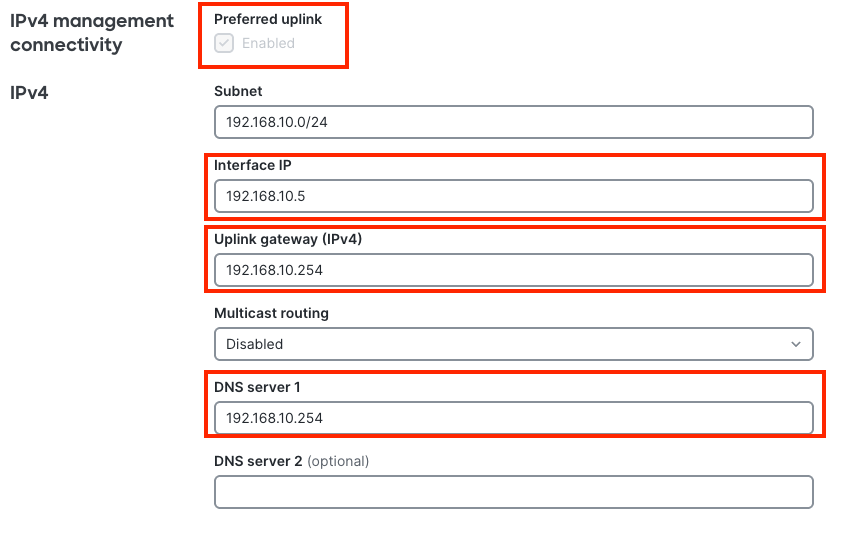
After creating the Management VLAN SVI on the dashboard, the original default route (0.0.0.0/0 via 192.168.20.254 in the example) will be removed from the device and there will be only one default route that points to management VLAN’s gateway - both the Cloud CLI and Routing & DHCP page reflect this:
KB-9300#show run | sec route
..
ip route 0.0.0.0 0.0.0.0 192.168.10.254 tag 2896997550
..
Scenario 4: Management IP via Static with subnet overlap with one of the SVIs
Pre-migration setup – on CS firmware:
The switch on CS firmware obtains the management IP (displayed as LAN IP on side bar) via Static assignment and the Static IP subnet overlaps with one of the L3 interfaces (SVIs) on Routing & DHCP page.
Post-migration behavior – on IOS-XE firmware:
- Switch Management VLAN: Due to an overlapping subnet, the switch ignores the old Management static IP configured from the CS firmware device’s sidebar (displayed as LAN IP) and uses already existing SVI’s Static IP for Management. Preferred uplink is not checked by default - the running configuration on the Cloud CLI will display the original SVI’s Static IP details for it.
KB-9300#show run int vlan 10
Building configuration...
Current configuration : 196 bytes
!
interface Vlan10
..
ip address 192.168.10.1 255.255.255.0
..
End
Default Route:
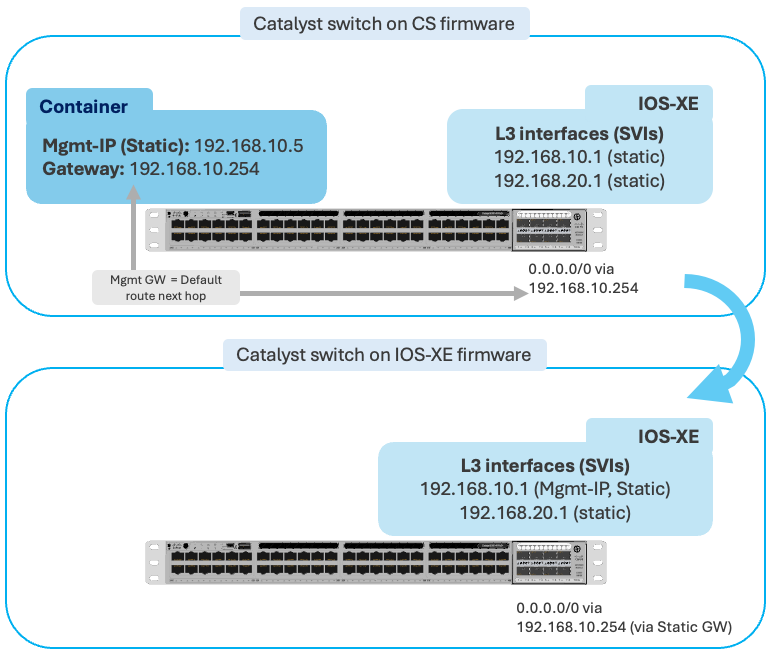
Scenario A
Prior to the migration, if management VLAN’s gateway = Default route next hop on Routing & DHCP page, there won’t be any change to the default route next hop after migration.
When migrating a layer 3 switch we recommend pre-configuring your switch to mirror Scenario 4a prior to migrating the switch. This will provide the best possible upgrade experience.
Scenario B
Prior to the migration, if management VLAN’s gateway ≠ Default route next hop on Routing & DHCP page, a new default route is created with Management VLAN’s gateway as the next hop - the Cloud CLI reflects this, showing both the routes.

In both the scenarios, Routing & DHCP page still shows only one default route with old next hop IP address that was previously used on CS firmware
Impact and recommendations
In scenario B, Due to the addition of new default route with management VLAN’s gateway as the next hop IP address, it may impact data traffic. There are also many limitations in changing the default route for this particular scenario.
Before proceeding with the upgrade, while the switch is on CS firmware, It is highly recommended to resolve the overlap to align the setup with Scenario 3 and follow the recommendations listed in it.
The ability to use different next hop addresses for management and data will be available soon.