How to Set a WPA Encryption Mode
Overview
This article explains how to set the Wi-Fi Protected Access (WPA) encryption mode for an SSID on Cisco Meraki MR access points.
Learn more with these free online training courses on the Networking Learning Hub:
Mixed encryption with MR access points
By default, SSIDs configured as WPA2 on MR access points use Advanced Encryption Standard (AES).
Wireless beacons and probe responses advertise the following encryption methods:
-
Unicast traffic: AES
-
Multicast or broadcast traffic: Temporal Key Integrity Protocol (TKIP)
You can find the advertised methods in the tagged parameters portion of the beacon and probe response management frames, in the "Robust Security Network (RSN) Information" element.
Prerequisites
WPA3 support
Wi-Fi 6-capable MR access points support WPA3 on MR 27.X firmware. For Wi-Fi 6-capable MR access points that run MR 26.7 or later firmware, contact Meraki Support to enable WPA3.
For more information about WPA3 and the access points that support WPA3, refer to the WPA3 Encryption and Configuration Guide.
Step-by-step instructions
Setting the encryption type
The WPA encryption setting is specific to each SSID.
Meraki deprecates Wired Equivalent Privacy (WEP) in MR 30.X and newer firmware. Limited configuration options exist on the old Access control page (Wireless > Configure > Access control > View old version > WPA encryption mode) until Meraki deprecates the page. For more information, refer to the WEP Deprecation on MRs article.
-
In the Meraki dashboard, go to Wireless > Configure > Access control.
-
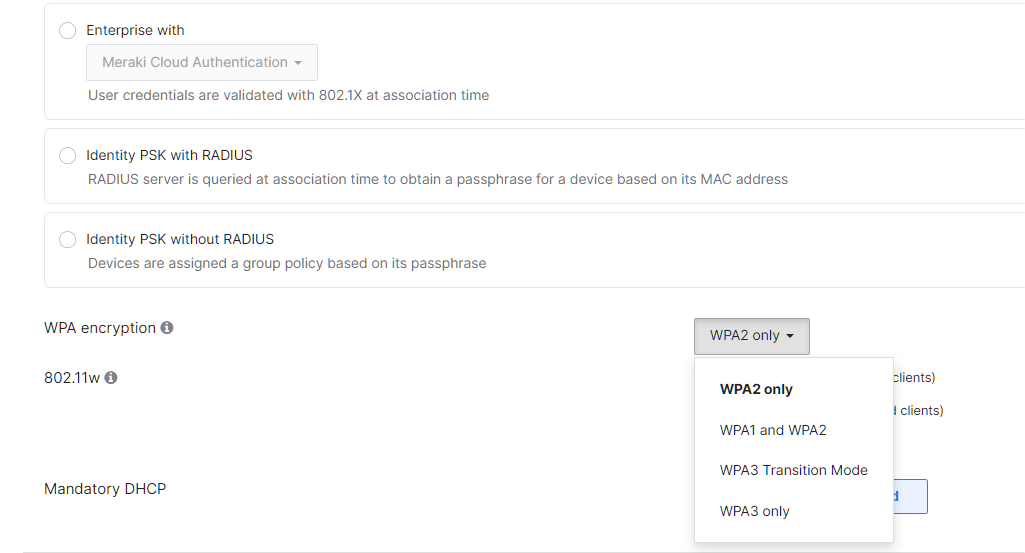
Next to WPA encryption, select an option from the drop-down menu.
By default, the drop-down menu includes the following options:
-
WPA2: forces AES (recommended for most deployments)
-
WPA1 and WPA2: sets the SSID to mixed encryption mode
If a client does not support AES, contact Cisco Meraki support to force TKIP only for the SSID.
The WPA encryption setting is SSID specific, and can be found on the Wireless > Configure > Access control page next to WPA encryption as seen below: