

Subscription Advantage Feature Tier Trials
Overview
Subscription licensing provides customers with a simple, flexible way to consume and manage Cisco solutions. To help customers determine the best fit for their network needs, we now offer Advantage Feature Tier Trials. This capability allows customers currently using the Essentials tier to evaluate the Advantage tier features for a limited time (30-days) at no additional cost.
This 30-day trial enables customers to experience advanced capabilities—such as Adaptive Policy, AI-RRM, and advanced security features—within their production environment before making a purchase commitment.
Initiating a Trial
Trials are managed at the Network level and are specific to a Product Class (e.g., Wireless, Switching, or Security/SD-WAN). This allows organization administrators to try Advantage features on a specific part of their infrastructure without affecting the entire network organization. Organization Admins can initiate a Feature Tier Trial directly from the Meraki Dashboard or using APIs.
-
Navigate to Organization > Configure > Subscriptions & license info page.
-
Select the Networks tab to view all networks and their current feature tiers.
-
Locate the Product Class (example, Security & SD-WAN) within the network you wish to upgrade.
-
Click Update Tier to Start a 30-Day Advantage Trial.

-
Once confirmed, all devices within that specific product class on that network will immediately inherit Advantage-tier capabilities.
-
The Meraki Dashboard will display a notification banner at the top of the subscription & license info pages to alert them of the active trial, licenses required to convert a trial and the specific expiration date.
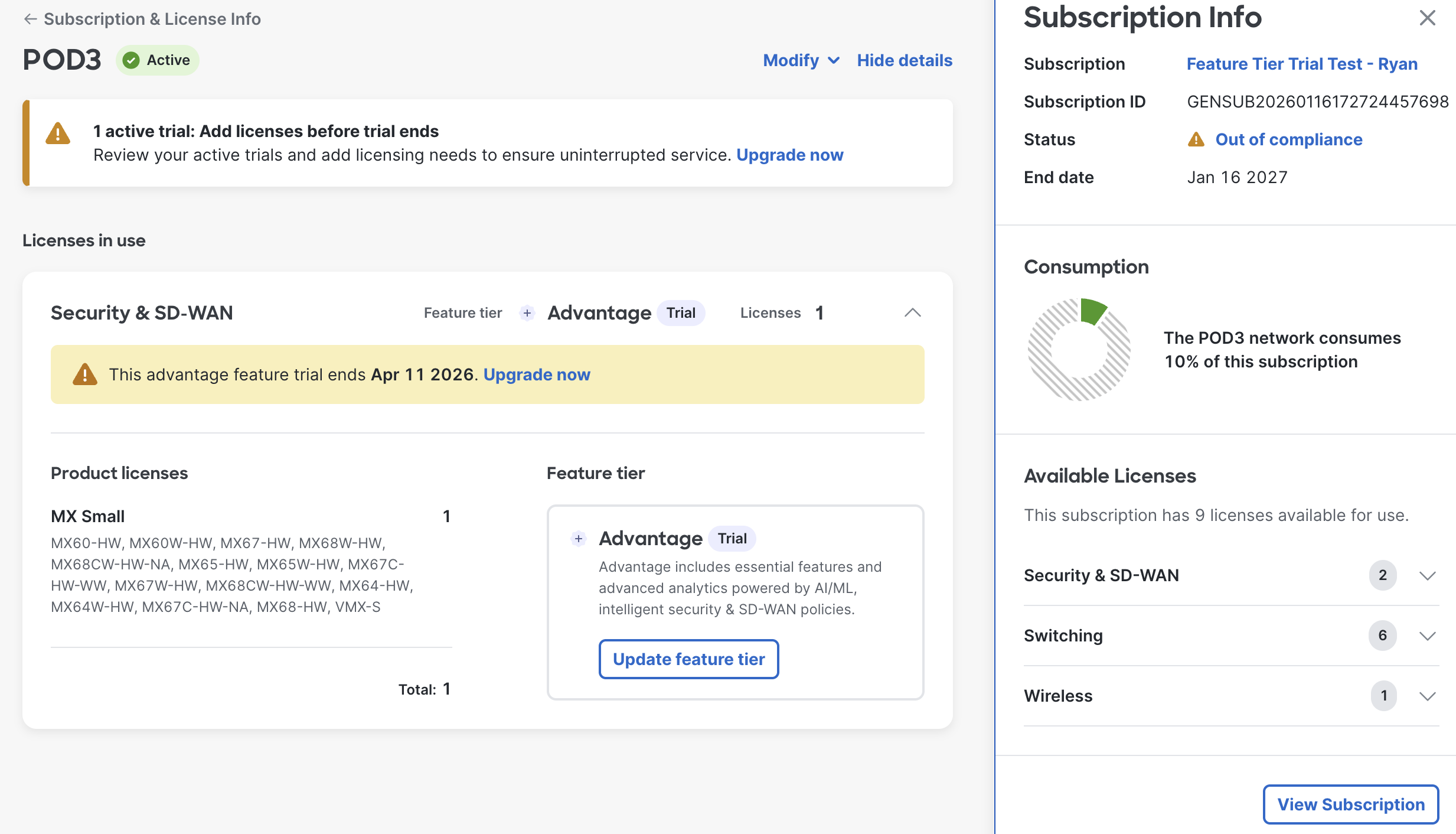
By upgrading to the Advantage trial, users gain access to premium capabilities. To learn more:
Feature Tier Trial Details
-
Duration: The trial lasts exactly 30 days.
-
Eligibility: Available for all organizations currently on the Subscription Licensing model.
-
Scope: Trials can be enabled at the network level for specific product classes (example, MX, MS, or MR).
-
Auto-Downgrade: At the end of the 30-day period, if no Advantage licenses have been purchased to the subscription bound to the network, the product class will automatically downgrade to its previous Essentials tier.
-
Impact on Connectivity: Network traffic and basic management will not be interrupted. Only the premium Advantage-tier features (e.g., advanced analytics or security) will be disabled.
-
Purchasing: To prevent auto-downgrade, org admins must contact their authorized Sales Partner to purchase the appropriate Advantage subscription licenses before the 30th day.
Trial Reset Policy
To ensure fair usage of the evaluation system, a reset period is enforced between trials on the same network product class.
-
45-Day Cooling Period: Once a trial for a specific product class within a network has expired, a 45-day reset period must pass before another trial can be initiated for that same product class on that same network.
Frequently Asked Questions (FAQ)
-
Can I extend the 30-day trial? Trials are fixed for 30 days. For longer evaluations, please contact your Meraki Sales Representative.
-
Will my network go out of compliance when the trial ends? No. At the end of the trial, the network simply reverts to the Essentials tier. You will not enter a grace period or face a management shutdown as long as your original Essentials subscription is active.
-
How do I find my sales partner to buy the license? You can find your primary contact information on your trial banners or under Help > Get Help > Contact Sales in the Meraki Dashboard.
-
Can I enable trial on a disabled network? No. At this time, a trial can only be enabled if the network is bound to an active subscription or is currently in a grace period (if not yet bound to a subscription).
-
Are networks bound to Enterprise Agreement (EA) Subscription eligible for Trial? No, Product Types covered by an EA already have the flexibility to upgrade or downgrade without a trial. If the customer uses the Advantage tier through their True Forward date, they will be billed for it. Product Types not covered by an EA Suite will be able to initiate Feature Tier Trials, like other unlicensed products.
-
Can I start a trial if my network is out of compliance? Yes. You may enable a trial if your network is bound to a subscription that is in product class compliance (grace period). It is important to note that the trial state and the subscription compliance states operate independently; starting a trial will not pause or reset an existing subscription grace period.