

Cisco Secure Access Integration - Design Best Practices
Overview
Today’s remote and hybrid workforce, widespread cloud adoption, and increased internet-bound traffic require organizations to deliver secure, optimized access to applications anywhere, on any device. Traditional network models struggle to keep pace, prompting organizations to embrace Secure Access Service Edge (SASE) architectures. By integrating Cisco Meraki SD-WAN with Cisco Secure Access, businesses benefit from unified, cloud-native networking and security, ensuring consistent protection, simplified operations, and a scalable user experience across all locations.
Cisco Meraki and Secure Access stand out with their centralized, cloud-based dashboards, enabling IT teams to deploy, monitor, and manage networks from anywhere—eliminating the need to build more on-premises controllers. The platform integration prioritizes simplicity, scalability, and automation, while offering built-in analytics and security for both enterprise and distributed environments. Managed through the Cisco Meraki dashboard, Meraki MX SD-WAN leverages AutoVPN technology to seamlessly orchestrate and provision Secure Access cloud hubs and tunnels between sites in a spoke-and-hub network.
This design best practices document outlines options for deploying Meraki MX SD-WAN with Secure Access to deliver a comprehensive SASE solution. Following these recommended designs will help ensure your network achieves optimal performance and security.
Dual Fabric Terminology
For clearer guidance, the following special terms describe devices and traffic paths within two SD‑WAN fabrics: Traditional Cisco Meraki MX SD‑WAN and Cisco SSE Secure Access.
Cloud Fabric: Transport via cloud hubs using Cisco Secure Access; cloud path or cloud transport
Cloud Spoke: Cisco Meraki spoke connected (enrolled) exclusively to the cloud
Cloud Hub: Cisco Secure Access-enhanced head‑ends that provide cloud transport and are designated with the CPSC‑HUB platform type in Cisco Meraki MX Dashboard
MX (Local) Fabric: Transport via MX hubs, using traditional Cisco Meraki MX SD‑WAN tunnels and routing; also referred to as the MX path or MX transport
Local Spoke: MX in spoke mode operating solely in the MX fabric, listing local or enrolled hubs
Local Hub: MX in hub mode that appears in a spoke's hub priority list
Dual-fabric devices:
Hybrid Spoke: MX spoke that uses both cloud fabric and MX fabric for traffic transport
Hybrid (Enrolled) Hub: MX hub that forms a mesh with other MX hubs while enrolled in the cloud fabric and route peering (hub‑to‑hub) with the region’s pair of cloud hubs
Further explanation on these terms can be found in the Secure Connect Hub Integration document.
Cisco SASE Supported Topologies for Meraki
The following diagrams show the difference between spoke-spoke communication when enabling secure private access for users.
Example Meraki topology:

Example Meraki topology via Secure Access: 
Why do these changes occur?
When deploying a SASE architecture, it is recommended to inspect East-West traffic between sites to maximize the security efficacy of the security services. Secure Access integration with Meraki org disables the direct Spoke-Spoke communication via MX Hub (2) to ensure all traffic is inspected, and policy is applied as intended (1).
Platform Optimization
To improve platform stability and resiliency, the following optimization is adopted at onboarding for all organizations that enable the Meraki Secure Access integration:
-
Dashboard installed routes are removed from all Spokes and Hubs.
-
BGP protocol is used as a sole method of providing routes to sites
-
Meraki Hubs are prevented from sharing the Spoke routes they learned toward other Spokes.
-
Cloud Spokes traffic to any other sites (any Spoke or Hub) prefers the cloud path
The table below describes the Cloud vs. Local tunnel path used by end points as they communicate.

* MX Hub (Hybrid or Local) must be configured on a Spoke to enable direct local-path access to its prefixes.
Scale of Sites and Routes in the Meraki Secure Access Solution
Organizations can support up to 1000 enrolled Sites, with each advertising a maximum of 10 routing prefixes to the Cloud Fabric. These MX-advertised prefixes encompass local subnets, eBGP-learned routes, and defined static routes. Cloud and Hybrid Spokes will receive a default route and specific routes known by the Cloud Hubs.
For quicker convergence with Cloud Hubs, Spoke sites can be configured to receive only a default route, bypassing specific iBGP route prefixes. This simplified routing also allows sites to advertise an increased limit of up to 28 prefixes with the 2500 enrolled Sites. To enable this reduced routing configuration for your regions, please contact Meraki support.
During the Early-Access period for this feature, organizations deploying below Design B (Hybrid Spokes with Hybrid and Cloud Hubs) can accommodate max of 2 MX Hybrid Hubs. For organizations using a small number of Sites, up to 10 MX Hybrid Hubs can be enrolled in Secure Access. Sites UI displays below warning message if 2-10 hubs are enrolled, and will prevent enrollment of more than 10 MX hubs.

To address broader deployment needs, increased scale for Spokes and Hubs is being validated and updated in this document. If the design you intend to use is not documented here, please contact your account team. Additional common scenarios have been identified for additional validation after the initial release and will be incorporated into this document as appropriate.
Use of templates significantly improves enrollment time of Sites. When Sites do not use templates, they should be enrolled in groups of no more than 200 Sites. Each batch should completely enroll before proceeding to enroll more sites. Contact Meraki Support for assistance.
Learn more about the 2025 Platform Optimization here, implemented first with Secure Connect.
These settings, derived from insights gained from the Secure Connect product and its underlying technology, ensure faster failover during Data Center outages. They also simplify spoke site routing, thereby reducing overall route complexity and improving BGP convergence.
Do I need a Maintenance Window?
-
Do you have the Secure Access Secure Internet Access package only (No SPA package purchased)?
-
Customers with the following packages may need a maintenance window:
-
Secure Internet Access (SIA) Essentials
-
Secure Internet Access (SIA) Advantage
-
Customers with the following packages will not need a maintenance window:
-
Secure Internet Access (SIA) + Secure Private Access (SPA)
-
DNS Defense is not yet supported via this integration.
-
Does your organization require spoke-spoke communication using an MX hub?
-
Every Meraki organization has this capability by default, but not all customers use it.
-
Some larger organizations use this to manage the scalability of their deployments when changing routing configuration.
If you have answered Yes to both questions above, you should schedule a maintenance window BEFORE enabling the Secure Access integration.
- In case your Meraki organization requires MX Hubs mesh feature to be DISABLED?
- Every Meraki organization has the Hub mesh enabled by default, but customers can ask Meraki support to disable this feature.
- Secure Access integration onboarding re-enables MX Hub mesh to enable support for MX Hub enrollment into SSE as part of Design B.
- If your organization has MX Hub mesh disabled, and you are onboarding to Secure Access integration, please ensure to contact support to intervene after onboarding and again disable the MX Hub mesh. Design C is the only scenario that supports disabled MX Hub mesh. If necessary, you can do so in the maintenance window.
Enabling Secure Access Meraki Integration in a Maintenance Window
Once you are in your scheduled maintenance window, complete the following steps:
-
Turn on the integration by completing these steps
-
Onboard the hubs & spokes to SSE by completing these steps
-
If you have SIA only and desire Spoke-Spoke communication, call support to have them disable the feature after you have onboarded your hubs & spokes to Secure Access.
-
You can reference this document or tell them that you “desire Spoke-Spoke communication” reinstated on your organization.
Use the Call Me Now feature in the Meraki dashboard to request an immediate phone call.
Phone calls guarantee faster response times and can deploy these changes during your maintenance window.
4. Optional: Organizations managing a large number of sites (over 500) enrolled in a single Secure Access region can enable the only-default-route for Spokes feature described in the Platform Optimization section of this document. Customers can request to enable this feature when they contact Meraki support. Learn more here.
Design A - Cloud Spokes and Cloud Hubs
This design supports both Secure Internet Access (SIA) and Secure Private Access (SPA) use cases. It provides a straightforward, cloud‑based SD‑WAN transport model in which all MX networks operate as Cloud Spokes.
All customer branch spokes are enrolled in Cisco Secure Access, and no MX hubs are deployed. All traffic-spoke‑to‑spoke, remote worker to site, and endpoint to IPSec‑attached applications-flows through the cloud path. Because MX hubs are removed from the design, it can scale to a very large number of sites, making it particularly suitable for environments such as retail deployments.

Is this Design for me? - Customer Traffic Profile
Organizations whose traffic is primarily north‑south toward the internet align well with this architecture. East‑west traffic is also carried through the cloud fabric and inspected by the cloud firewall, consolidating traffic into a single security and routing domain.
Organizations with 500 or more sites within a region can benefit significantly from this approach by reducing the number of hub connections required and minimizing route scale at spokes. This design also appeals to customers who prefer not to purchase, host, or maintain hub hardware.
All MX appliances function as Cloud Spokes connected to the cloud fabric. Remote workers can reach any spoke‑advertised prefixes through the cloud. Each Spoke can select the nearest Cloud Hub as its primary, and all Cloud Hubs automatically form a mesh within Secure Access.
Design A - Pros
• Simplified SD‑WAN architecture with minimal configuration
• Supports both SIA and SPA use cases
• Small routing tables at spokes, with the cloud fabric providing full prefix reachability
• No MX hub hardware to deploy or maintain
• Cloud firewall protection for east‑west traffic
• DIA breakout supported, allowing spokes to send trusted SaaS traffic directly to the internet
• Ideal for customers with 500+ sites
• Broad regional coverage through Secure Access integration
Design A - Cons
• No support for MX Local Hubs or Hybrid Hubs
• Less flexibility to alter traffic paths
• No customer‑owned hubs to provide backup for cloud transport-traffic relies entirely on the cloud fabric as the backbone
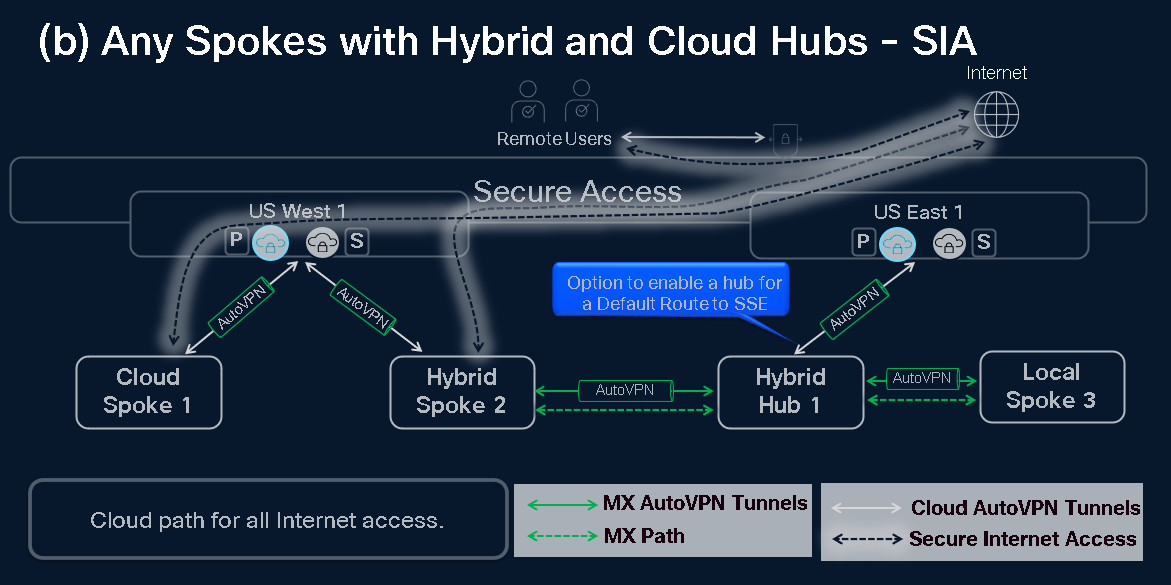
Design B - Any Spokes with Hybrid and Cloud Hubs
This design supports both Secure Internet Access (SIA) and Secure Private Access (SPA) use cases. It allows a mix of Cloud Spokes, Hybrid Spokes, and Local Spokes, creating a flexible architecture that can adapt to varying connectivity and application access needs.
In the SPA use case, Cloud Spokes use the cloud path for application access, while Hybrid and Local Spokes can use the MX path to reach applications directly through their enrolled MX hubs. In private access scenarios, an MX‑based traffic path (dotted green) is used by Hybrid Spokes to access Hybrid Hub resources.

For internet‑bound traffic, Secure Internet Access (SIA) is used for most sites. Even Hybrid Hubs can enable a default route via SSE to send internet traffic through the cloud path for SIA.
Is this Design for me? - Customer Traffic Profile
This design supports a broader range of traffic patterns by leveraging both the Meraki SD‑WAN fabric and the cloud fabric. Customers can selectively route east‑west traffic through the Meraki SD‑WAN fabric when needed, bypassing the cloud fabric. This flexibility increases capability but also introduces more complexity compared to simpler designs.
All traffic directed into the cloud fabric is subject to a unified cloud firewall policy. East‑west flows-such as spoke‑to‑hub, remote‑worker‑to‑SD‑WAN, and spoke‑to‑spoke-can be governed by this common security layer. When Hybrid Spokes communicate directly with Hybrid Hubs through the MX fabric, these flows bypass the cloud firewall.
Cloud Spokes can still be used for the majority of branch sites, maintaining simple routing and configuration. Hybrid Spokes provide additional flexibility by enabling direct communication to selected Hybrid Hubs when performance or latency advantages exist. Remote workers (RAVPN or ZTNA) must be explicitly permitted in policy to access SD‑WAN resources. Applications behind SD‑WAN must also be defined and allowed as policy destinations.
Resources connected through the cloud transport can communicate freely, except when Hybrid Spokes are configured with priority MX Hubs. Assigning a Hybrid Hub in the hub‑priority list ensures direct MX‑tunnel connectivity from that Hybrid Spoke.
Design B - Pros
- Supports both SIA and SPA use cases
- Spoke‑to‑spoke traffic can traverse the cloud with a common security policy
- Hybrid Spokes allow direct spoke‑to‑hub access through the MX fabric to improve performance or latency
- Cloud Spokes maintain simple configuration while providing full access to cloud resources
- Provides a balanced approach between security and direct connectivity
- Faster convergence improves onboarding speed and redundancy
- Additional redundancy from Local and Enrolled Hubs ensures east‑west traffic continues even if the cloud path experiences issues
Design B - Cons
- Requires additional MX hardware for Local and Enrolled Hubs
- Dual‑backbone routing increases complexity and troubleshooting difficulty
- Routing defaults to the cloud path, with direct MX‑based paths used only when configured on Hybrid Spokes
- Hybrid Spoke-to-Enrolled Hub traffic bypasses the cloud firewall
Design C: Any Spokes with Local and Cloud Hubs
This design aligns best with the organizations that purchase only the Secure Internet Access (SIA) package. It is centered on maintaining the traditional SIG (Secure Internet Gateway) model, where the MX SD‑WAN fabric handles east‑west traffic. It preserves high‑performance interconnectivity over MX WAN links while avoiding cloud‑based inspection for private traffic. In this model, Hybrid Spokes list both cloud and MX hubs, with MX hubs prioritized over cloud transport.


Is this Design for me? - Customer Traffic Profile
This design provides SIA protection for enrolled Hybrid Spokes with direct MX transport to maintain the performance benefits of the Local Fabric. Furthermore, this architecture is future-proof; organizations can transition to cloud-based east-west transport after adding an SPA user license. Cloud Spokes are excluded from this design as they lack local fabric connectivity.
Configuration and Connectivity
To achieve optimal connectivity for Spoke-to-Hub application access, configure the relevant Local Hubs on all Hybrid Spokes.
- Local Hub Reachability: A Local Spoke can communicate with applications hosted on the configured MX Hub; however, it cannot reach Cloud Spokes or endpoints enrolled in the SSE.
Spoke-to-Spoke Communication
When you enable Spoke-to-Spoke communication via a Local MX Hub, it impacts the routing behavior of all Spokes, as traffic paths will prioritize local MX Hubs.
- Fabric Compatibility: Hybrid and Local Spokes that share the same group of MX Hubs can communicate effectively. Maintaining a consistent group of local Hubs across Hybrid Spokes ensures a direct path of connectivity.
- Cloud Limitations: Cloud Spokes are not part of the Local Fabric and, therefore, cannot communicate with other Spokes in this configuration.
Remote Access (RAVPN and ZTNA)
Remote workers using RAVPN or ZTNA have specific limitations in this design:
- Local Hubs: Remote workers cannot access subnets located behind Local Hubs.
- Hybrid Spokes: Networks behind Hybrid Spokes are treated as cloud-enrolled resources and are fully reachable by remote workers.
Transport Prioritization
Resources connected via cloud transport maintain full communication protected by the cloud firewall. Hybrid Spokes always prioritize a direct path to Local Hubs to reach those applications and do not use the Cloud path. Reaching other Spokes with "Spoke-to-Spoke via MX Hub" is ensured by sharing the same group of configured Local Hubs.
Design C - Pros
-
Simple deployment for customers focused exclusively on the SIA use case
-
Spoke‑to‑hub and spoke‑to‑spoke traffic stays on the MX transport for full MX platform performance
-
Familiar SIG‑style architecture with MX transport preferred over cloud transport
Design C - Cons
- Spoke-to-spoke and spoke-to-hub traffic is not inspected by the cloud firewall
- Hybrid Spokes must maintain consistent Hub priority lists
Support for additional Meraki designs is being validated now that Meraki with Secure Access solution reached General Availability.