

Locating the Meraki Customer Number or Support Passcode
Find the Meraki Customer Number (MCN) and Support Passcode in the Cisco Meraki dashboard. Meraki Support uses this information to verify accounts and users' identities associated with the dashboard organization for security purposes.
Find Meraki Customer Number (MCN) and Support Passcode
Find your MCN and Support Passcode under the profile icon in the top-right corner of the dashboard.
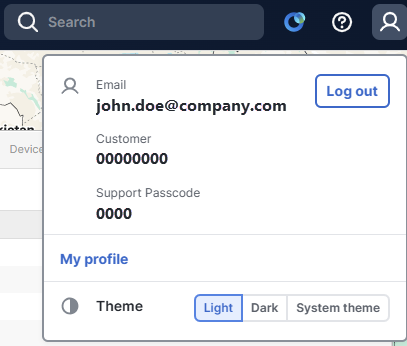
You can also find your Support Passcode on this dropdown menu under My profile. The passcode is in a section labeled Your support passcode for today.

Support Center
If you prefer to call in Meraki Support, find your Support Passcode by following the prompts on the Support Center page. Your Support Passcode is required for the call-in experience.
Refer to the Call Me Now documentation for more information.
The Support Passcode displayed is unique for each dashboard user, and is randomized daily. A passcode provided on a given day will be different the following day, and there is no historical record of previous passcodes.