

Cisco Meraki Local Status Page: MG Cellular Gateways
Click 日本語 for Japanese
MG Cellular Gateways LSP Overview
This article covers the features, configuration options, and access methods available on the Cisco Meraki Local Status Page (LSP) for MG Cellular Gateways. It outlines how to use the LSP for monitoring connectivity, adjusting network settings, troubleshooting, and managing various configuration options. By default for MG devices on 4.1.1+ firmware, the LSP uses the "admin" as the username and the serial number/Cloud ID of the device as the password, older firmware uses the username as the serial number without a password.
Accessing the Local Status Page
MG Local Status Page Options
Every device's status page includes useful information about the status of the device, limited configuration options (such as setting a static IP), and other tools. This section will cover what is available for each device.
Note: The speed test functionality on the local status page is deprecated on all MG cellular gateway devices starting with MG 3.1+ firmware.
MG21
MG21 cellular gateway provides the following information and configuration options on their local status page:
- Connection
Provides information regarding the client's connectivity to the MG cellular gateway, including the current cellular network status, cloud connectivity, and signal information.

Connection page from MG 1.11 onwards:
Note:On MG 1.11+, the Connection tab now only presents basic information about the carrier, APN, and signal strength. A new Cellular Status tab presents additional information on the status of the cellular connection.
_-_Blurred.png?revision=1&size=bestfit&width=970&height=522)
.png?revision=1&size=bestfit&width=970&height=513)
The connection statistics is moved to Cellular Status Page
- Cellular Status

- Configure
Configure section contains options for modifying bearer settings such as Access Point Name (APN), PIN, and authentication. The Integrated Circuit Card Identifier (ICCID) of the SIM card and International Mobile Station Equipment Identity (IMEI) of the MG cellular gateway can also be found in this section as well. Wired WAN mode/Safe mode portion allows you to reconfigure port 1 into a WAN role for troubleshooting. For more on Safe mode/Wired Wan Mode please refer to : Wired Wan Mode on MG
Note: The MG cellular gateway will perform a soft reset on both interfaces immediately after saving port 1 role change. For example, this is in similar fashion to the MX security appliance when enabling the secondary WAN port on an MX67. It is recommended to toggle this change when out of production hours to prevent disruption of network connectivity.
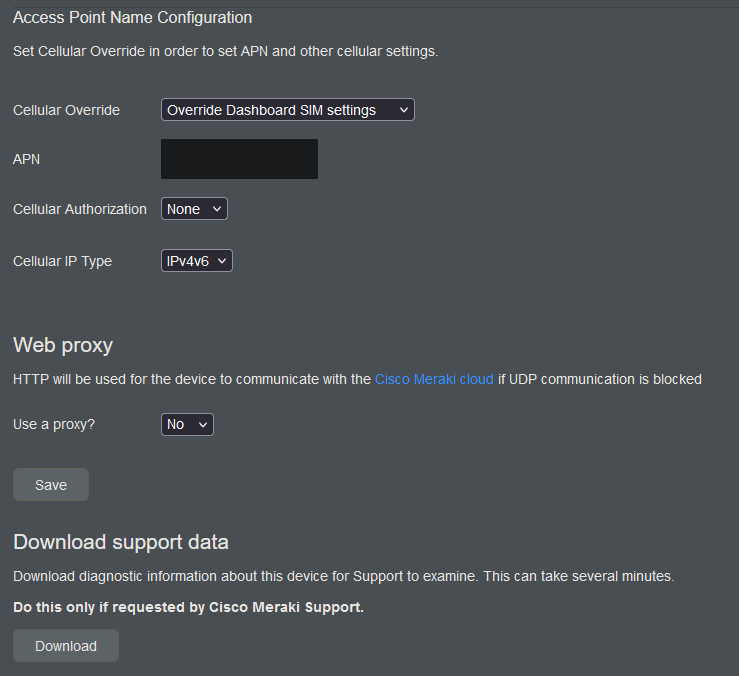
- Access point Name Configuration can be configured when clicking on the cellular override drop-down menu.
- Web proxy allows all default management traffic from the Meraki device to be sent through a proxy.
- Download support data function will allow you to download a special file to submit to Meraki support for additional troubleshooting if you are unable to get the unit online (see more in Support Data Bundle (SDB) article).

- Ethernet
Allows local changes to the speed/duplex settings of the LAN ports.

MG41/MG51/MG52
- Cellular Status
The cellular statistics is moved to a new "Cellular Status" tab on the MG41.

- Configure
The MG41 also provides an option to switch the SIM slot. If there is more than one active SIM card, its possible to set the APN settings for the standby SIM card in advance. If the primary SIM card needs special/private APN settings different from what the MG41 is currently using, then the "Override Primary SIM" setting can be used to override the necessary APN. - APN Configuration on Newer Firmware
On new versions of firmware, the Local Status Page offers two APN configuration options from the "Cellular Override" dropdown:- "User Meraki Dashboard SIM settings" which has no text entry field below it.
- "Override Meraki Dashboard settings" which will leave space for you to enter an APN, as well as another box for entering IPv4/IPv6 preferences and username/password settings.
- Differences Between Old and New APN configurations Settings Compared
"Override Meraki Dashboard settings" works exactly as "Override SIM settings" did in the past, allowing you to configure an APN without a dashboard connection and has been renamed to emphasize its difference from the other option which is not functionally the same as the previous "Don't Override SIM settings" option.- "Use Meraki Dashboard SIM settings" is a functionally new option which disables previously configured LSP APN configurations in favor of using the ones sent by the dashboard. It therefore acts as an “undo” button of sorts.

The MG41 has two PoE ports; however, the LAN1 port can be converted to WAN1 using the Wired WAN Mode/Safe Mode option for additional troubleshooting.
DM Logging Tool
The DM Logging Tool can be found on the LSP Configure Tab. More Information on DM Logging Tool can be found here.
SIM PIN
The SIM PIN is an additional security feature enabled on the SIM card to protect against unauthorized use and theft. It prevents the SIM card from being used in devices other than the authorized one by requiring a Personal Identification Number (PIN) for access
MG21/MX67C/MX68CW
Unlocking a SIM
On the LSP, SIM PIN unlock is available under the Configure tab. Up to three attempts are allowed to enter the correct PIN.
If the SIM does not have a SIM PIN, the "Number of PIN attempts remaining" are not shown. When a sim card with a SIM PIN enabled is inserted, the number of attempts remaining" is displayed.
If the PIN is entered incorrectly three times, the SIM card will be locked for security. After the third incorrect attempt, the SIM becomes PUK-locked. At this stage, the PUK code must be obtained from the service provider.
To unlock the SIM, remove it from the device, insert it into a smartphone, and enter the PUK code when prompted. Once the SIM has been successfully unblocked, it can be reinserted and used in the device again.
.JPG?revision=1&size=bestfit&width=754&height=385)
As part of MG26.1, we have introduced SIM PIN on the MG41, MG51 and MG52.

As an improved security measure, the system supports SIM cards that require a Personal Identification Number (PIN).
-
PIN Requirements: The PIN must be between 4 and 8 digits.
-
LSP Limitations: A SIM PIN cannot be enabled or disabled via the Local Status Page (LSP).
-
Persistence: The SIM PIN is automatically applied whenever the SIM is activated for the very first time and remains persistent across system reboots. Users do not need to re-enter the PIN every time the device restarts/reboots.
Note : If the node undergoes a factory reset, the stored PIN map is cleared, and the user will be required to re-enter the PIN.
Monitoring SIM Status
Users can monitor the current state of your SIM card through the Cellular Status page or the Dashboard. The following statuses may be displayed:
-
Active: The SIM is unlocked and functioning normally.
-
PIN Required: The SIM is locked and requires a PIN to be entered.
-
PUK Required: The SIM is blocked due to multiple incorrect PIN attempts and requires a PUK code.
-
Blocked: The SIM is permanently disabled and should be replaced.
-
Unknown: The system cannot currently determine the SIM status.
Unlocking a SIM (PIN Entry)
When a SIM card is inserted that has a PIN enabled, you will be prompted to enter the PIN to enable the SIM and allow the system to use it to gain network access.
-
Attempts: You are allowed 3 attempts to enter the correct PIN.
-
Remaining Attempts: The interface will display the number of PIN attempts remaining.

Unblocking a SIM (PUK Entry)
If the incorrect PIN is entered 3 times, the SIM card will be locked for security purposes. To restore service, you must use a PIN Unlock Key (PUK).
-
Obtaining a PUK: You must contact your Service Provider (SP) to receive the 8-digit PUK code specific to your SIM card.
-
Resetting the PIN: When entering the PUK to unblock the SIM, you will be required to set a new SIM PIN at the same time.

If the PUK is entered incorrectly 5 times, the SIM can no longer be unblocked via the system LSP and must be unblocked using a mobile phone or replaced.

Note: MG 4.1.1 provides secure access and communication to the local status page for all MG Cellular Gateway and Meraki products by using Transport Layer Security (TLS) on port TCP 8092.
The local status page has been updated to support TLS and will now redirect from http://mg.meraki.com to https://mac-address.devices.meraki.direct