

January-March 2026
This page contains Workflows updates published from January to March 2026.
March 27, 2026
Cisco Workflows API Now Accessible via Standard Meraki API Path
Cisco Workflows has new cloud-based RESTful APIs to programmatically automate your network operations at scale. You can trigger workflows, manage resources, and access functions not available in the GUI — all through standard API calls.
Highlights
-
OpenAPI Specification: Download the Automation OAS file to explore all available endpoints and auto-generate client libraries.
For more information, see Using the Workflows API.
Account Keys adds Support for Bearer Auth and Custom Header Auth
Two new Account Key types are now available — HTTP Bearer Authentication and HTTP Custom Header Authentication — giving you more flexible ways to authenticate against HTTP targets (endpoints).
HTTP Bearer Authentication Configure a bearer token that is sent via the Authorization header when authenticating against an HTTP target.
HTTP Custom Header Authentication: Configure a custom header name and value used for authentication(e.g., X-MERAKI_API: <value>). Similar to custom headers in workflows, this allows you to securely set a reusable header as an Account Key tied to a target.
For more information, see Targets Account Keys.
Meraki - Current Org Target
A Meraki target is now automatically created and managed for your organization — no manual setup required. When you access Automation for the first time or when your environment is provisioned, a Cisco-managed Meraki target is created for you automatically.
How It Helps You
Previously, you had to manually create a Meraki API key and target before running any Meraki workflows. Now, the system handles target creation and keeps it up to date automatically — reducing setup time and ensuring your Meraki connection is always ready to use.

For more information, see Meraki - Current Org Target.
Activities Panel Subcategories
The Workflows Editor Activities panel now supports subgroups for atomic workflows and activities. Related atomics within a group can now be organized into nested, collapsible subgroups — making it easier to browse and find the right action.
Key highlights:
-
Each subgroup appears as a collapsible section nested under its parent group.
-
Set the Activity Sub-Group field when creating an atomic workflow to assign it to a subgroup.
-
Groups like "ServiceNow" can now have subgroups such as "Change Requests", "Incidents", and "Users".
Subgroups will be rolled out across all system atomics and activities in future updates, making every group easier to navigate as the library continues to grow.
What's Changed:
-
Subgroup organization: Atomic workflows can now be grouped into subgroups within their parent group. For example, "ServiceNow" atomics can be further organized into subgroups like "Change Requests", "Incidents", and "Users".
-
Collapsible subgroup sections: Each subgroup appears as a collapsible section nested under its parent group in the Activities panel.
How It Helps You:
Previously, all atomics within a group appeared in a single flat list. As the number of atomics grew, finding the right one became harder. Now, with subgroups, related atomics are organized into meaningful categories — so you can quickly drill down to the action you need.
For more information, see Activities Panel Subcategories.
Workflows Source IPs Now Available in Firewall Info
Workflows source IP addresses for all deployment regions are now available in Help > Support > Firewall Info within the Meraki Dashboard. This makes it easy to find the IPs you need for firewall configuration.
How It Helps You
If your environment uses firewall rules to restrict inbound connections, or if you use the Meraki Dashboard with IP restrictions, you need to allow traffic from Workflows source IPs. Previously, finding these IPs required contacting support. Now they're available directly in the Dashboard.
Where to Find It
-
In the Meraki Dashboard, click Help in the navigation.
-
Go to Support > Firewall Info.
-
Workflows source IPs for all deployment regions are listed there.
When You Need This
-
API-restricted Dashboard access: If your Dashboard is configured with IP restrictions, ensure the Workflows source IPs are permitted.
-
Target creation without Remote: When creating HTTP Endpoint targets that connect directly (without using a Remote), your firewall must allow traffic from the Workflows source IPs.
February 20, 2026
Enhanced Notifications for Pending Tasks
You can now configure the email addresses of users who will be notified and prompted to take action on pending tasks within the Create Prompt and Request Approval activities. Use View Task to check any outstanding actions for these activities. For more information, see Create Prompt Task and Request Approval Task .
Workflow Editor Updates: Beta and Deprecated Labels
The Activities panel in the Workflow editor now displays Deprecated and Beta activities. Deprecated activities are marked with a  icon and include suggestions for alternative activities you can use.
Activities marked as deprecated will be available only for 6 months, after which they will be removed from the panel. Users are advised to adopt the recommended alternative during this time period.
Beta activities are indicated with a  icon and are available for early access to gather feedback.
Beta features will only be visible if you have enabled them in Organization > Configure > Early Access.
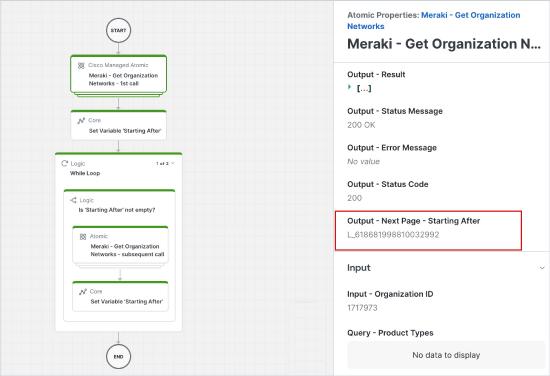
Improved Pagination Support for Meraki Atomics
Workflow designers can now easily access and utilize pagination details to loop through and retrieve all pages within workflows that use Meraki Atomics.
The example below shows how Meraki Atomics includes next page details in the response, which can be used to fetch each subsequent page until all data is collected.
February 6, 2026
New NetBox Atomics
Workflow now includes new atomics for NetBox, the open-source platform for IP address management (IPAM) and data center infrastructure management (DCIM). These 79 new atomics are organized into different categories that can be accessed through Workspace > Workflow Activities> NetBox. For more information about the Netbox adapter, see Target Types for the list of supported adapters in Workflows.
NetBox Categories (79 atomics):
NetBox - DCIM: 51 atomics
NetBox - IPAM: 25 atomics
NetBox - Tenancy: 1 atomics
NetBox - VPN: 1 atomics
NetBox - Wireless: 1 atomics
January 21, 2026
Support for SD-WAN Cloud Instances
SD-WAN cloud instances are now supported within workflows and can be connected directly, without a Remote target. For more information, see SD-WAN Endpoint Target.
Catalyst Center Adapter: New Actions for Template, Device, and Inventory Management
The Catalyst Center Adapter has been enhanced with new actions that extend automation capabilities across key areas, such as template management, network settings, device management, provisioning, inventory management, SD-Access, and software image management.
New Catalyst Center Activities
Workflows now includes 732 new activities for Catalyst Center, further enhancing automation capabilities across the platform. These activities are available under Workspace > Workflow Activities > Catalyst Center. For additional information about the Catalyst Center adapter, see Target Types for the list of supported adapters in Workflows.